Guide to Create Your Branded Company Careers Page: The First Step to Attracting Top Talentx
A recruiter’s North Star is undeniably the company’s careers page. You post job ads on various platforms like Linkedin, Indeed, Monster, or other platforms to

CONTENTS
- 01Guide to Create Your Branded Company Careers Page: The First Step to Attracting Top Talent
- 02Key takeaways
- 03Best Practices To Build A Branded Careers Page
- Embed your brand identity
- 04Be the Storyteller of your own brand
- 05Choose automation & customization wherever possible
- Result?
- 06Choose SEO-friendly career page builder
- 07Practice Strong Branding
- 08Career page SEO and conversion checks competitors often miss
- Keep the careers page accurate
- 09Best hiring software with AI job description generator and auto publish to careers page
- AI job description generator: keep human approval in the publishing loop
- 10What should a branded careers page include to convert candidates?
- 11Make your careers page a reliable hiring destination
- 12Frequently Asked Questions
- Frequently Asked Questions
- What is a Branded Company Careers Page?
- Why is a Branded Careers Page important?
- What elements should be included on a Branded Careers Page?
- How does a Branded Careers Page enhance recruitment efforts?
- How can a Branded Careers Page improve candidate experience?
- What makes a branded careers page convert candidates?
- Should every job have its own page?
- Does a branded careers page need JobPosting structured data?
- How can I make a careers page accessible and mobile-friendly?
- Which metrics should I track on a branded careers page?
Guide to Create Your Branded Company Careers Page: The First Step to Attracting Top Talent
Your careers page is often the first place a candidate checks after seeing a job listing. It should explain why the work matters, show current roles, answer practical questions about location and benefits, and make applying straightforward.
A strong page connects your employer story to accurate job information. This guide shows you how to build that experience with clear content, accessible design, searchable job pages, and a review process that keeps closed roles and outdated details off the site.
a branded careers page converts better when it connects a truthful employer story to current, searchable roles and a short, accessible application path. Hiring software can draft and publish faster, but a human should approve the role facts, salary, eligibility, structured data and final page before it goes live.
Key takeaways
- A branded careers page should answer five questions quickly: why should I work here, which roles are open, where is each role based, what is the hiring process, and how do I apply?
- Put the employer value proposition, a clear View open roles call to action, current job listings, specific benefits, and the application steps near the top of the page.
- Give every live job its own crawlable URL with a clear job title, location or remote policy, employment type, salary information where available, requirements, closing date, and a direct application path.
- Use JobPosting structured data only on pages that contain a real open role. Remove or expire the markup when the role closes so candidates and search engines do not receive stale information.
- Treat mobile completion, keyboard navigation, readable contrast, short forms, and transparent expectations as conversion requirements, not optional design details.
- Measure the page as a hiring funnel: source visits, job-detail views, apply-start rate, completed-application rate, and drop-off at each form step.
01Best Practices To Build A Branded Careers Page
As HR professionals and recruiter, a branded company career page
is an asset That is why you need to double down on the best practices that resonates with your target audience and upholds your organization’s brand identity. Here are the expert-guided best practices.
1. Embed your brand identity
Candidates might find it challenging to discern one company from another while job search. After all, every organization claims to be a great place to work, right? To cut through the marketing noise and get a genuine feel for a company, job seekers lookout for uniqueness.
Just like a photo or video can tell a story, a company’s brand identity reveals its true character. Are they formal and buttoned-up, or are they laid-back and creative? Does their branding suggest innovation, tradition, or community?
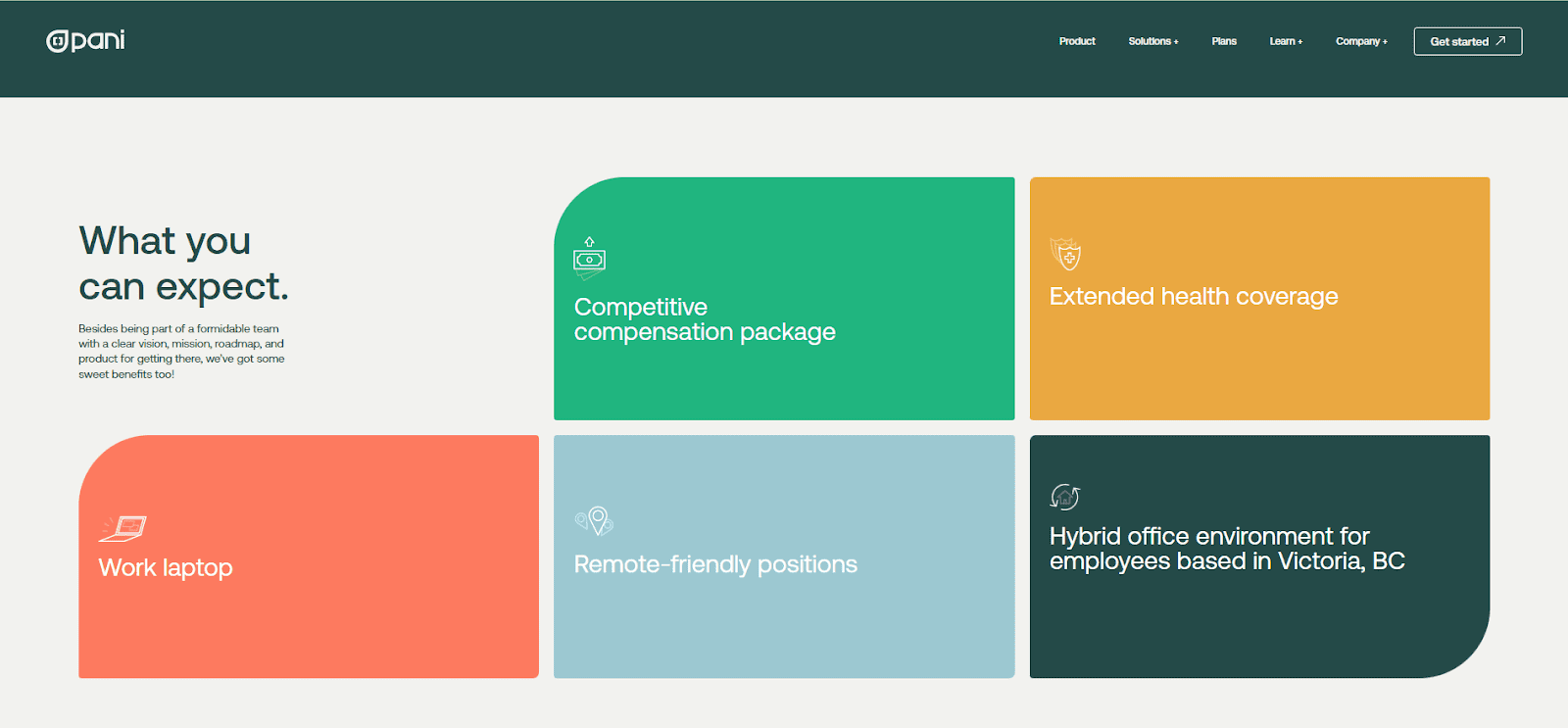
For instance, consider Pani Global their career page isn’t filled with jargon; it showcases the company’s essence. Through the choice of colors, fonts, and overall design, you can sense a commitment to innovation and a progressive culture. These design elements speak to the company’s identity and the type of environment they’ve create
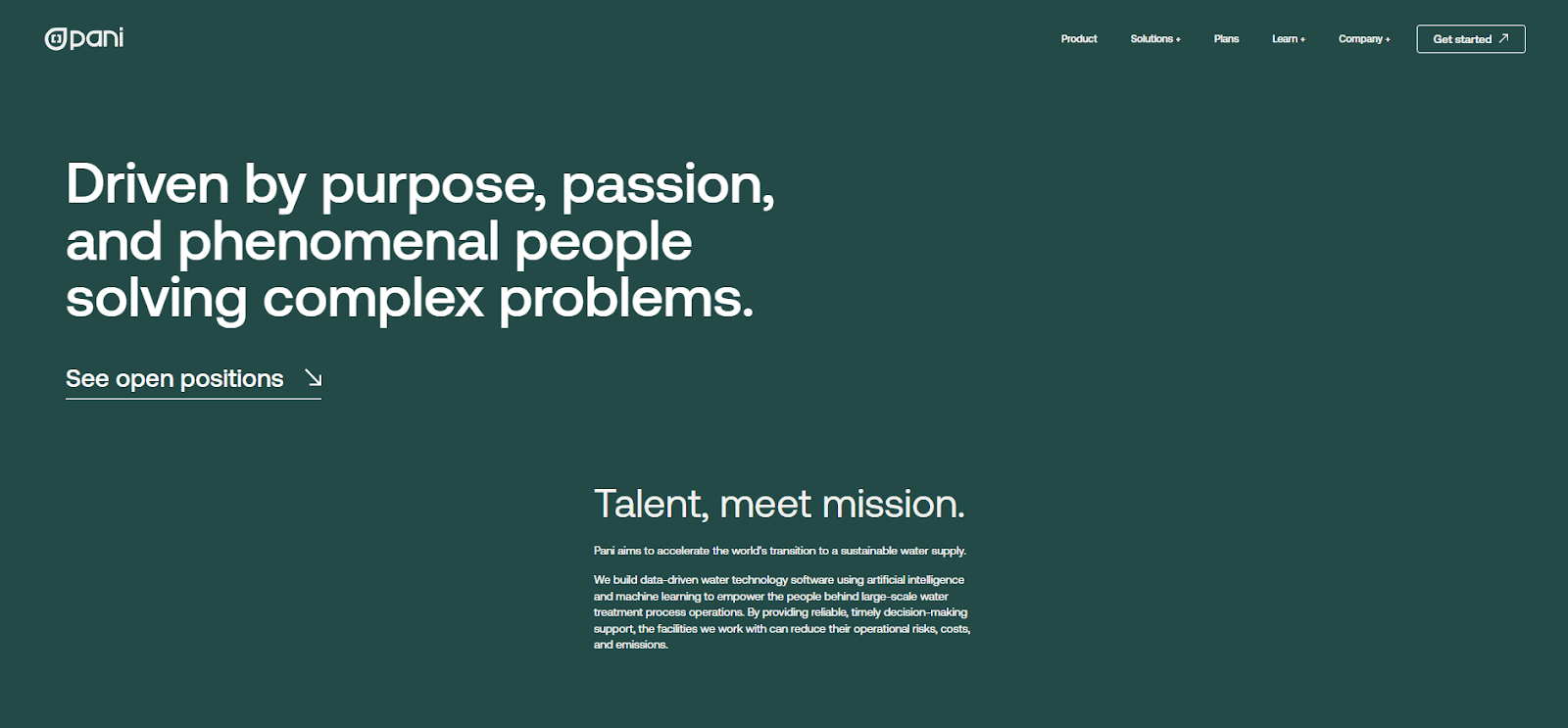
They have created their career page using Recooty’s no-code platform to highlight their brand’s vision, values, company culture, reasons to work there, and open positions. They have pretty masterfully worked using minimal design and color palettes.
02Be the Storyteller of your own brand
As the saying goes, “seeing is believing.” Job seekers are naturally drawn to positive and engaging aspects of a company’s culture, when they see visuals at your career page such as social gatherings, conferences attended, celebrations, and even a little love note for your own product or services. These elements, when presented in high-quality visuals, can make your company stand out and are a crucial best practice when crafting a career page.
Every organization is a collection of individuals, each with their own unique personality. These visual elements, the photos and videos, are powerful tools that communicate the essence and character of the company to you, the job seeker. They give you an unvarnished look behind the scenes.
Recooty’s own company career page
also includes customer testimonials from clients who are using Recooty’s company career page builder for years. Testimonials are featured beautifully at the beneath of our careers page.
03Choose automation & customization wherever possible
HR and recruiters often find themselves spending precious time manually updating job listings. This not only consumes valuable hours but can also lead to errors and outdated information. Auto-updating open roles solves this issue by ensuring that the latest job openings are always displayed on the career page.
Recooty’s
auto-updating open roles feature ensures that your career page is always up to date. No more manually adding, editing, or removing job listings. When a new role opens, it’s automatically posted; when a position is filled, it’s promptly removed. Candidates can browse your career page confident that they’re viewing the latest job openings.
Application forms can be configured to collect specific data relevant to each role. This structured approach ensures that you receive consistent, actionable information. Plus, automation tools can store and categorize applicant data efficiently, making it readily accessible when needed.
Result?
- Automated responses to applications,
- Acknowledgments, and
- Updates on the hiring process can be set up.
04Choose SEO-friendly career page builder
An SEO-friendly career page is a golden nugget, it makes easier for job seekers to find your job openings. By optimizing your content with relevant keywords, meta descriptions, and structured data, your career page can soar through Google’s rankings, ensuring it’s one of the first results candidates see when they search for positions in your industry.
With Recooty’s branded SEO-friendly career page builder, your website will
- load faster,
- mobile-responsive, and
- offer a smooth navigation experience
05Practice Strong Branding
Hosting your career page on a custom domain ensures a consistent and strong brand presence. Your organization’s name is front and center. With Recooty’s customization feature and free custom domain hosting you have the freedom to design and structure the page as you see fit, aligning it precisely with your brand identity.
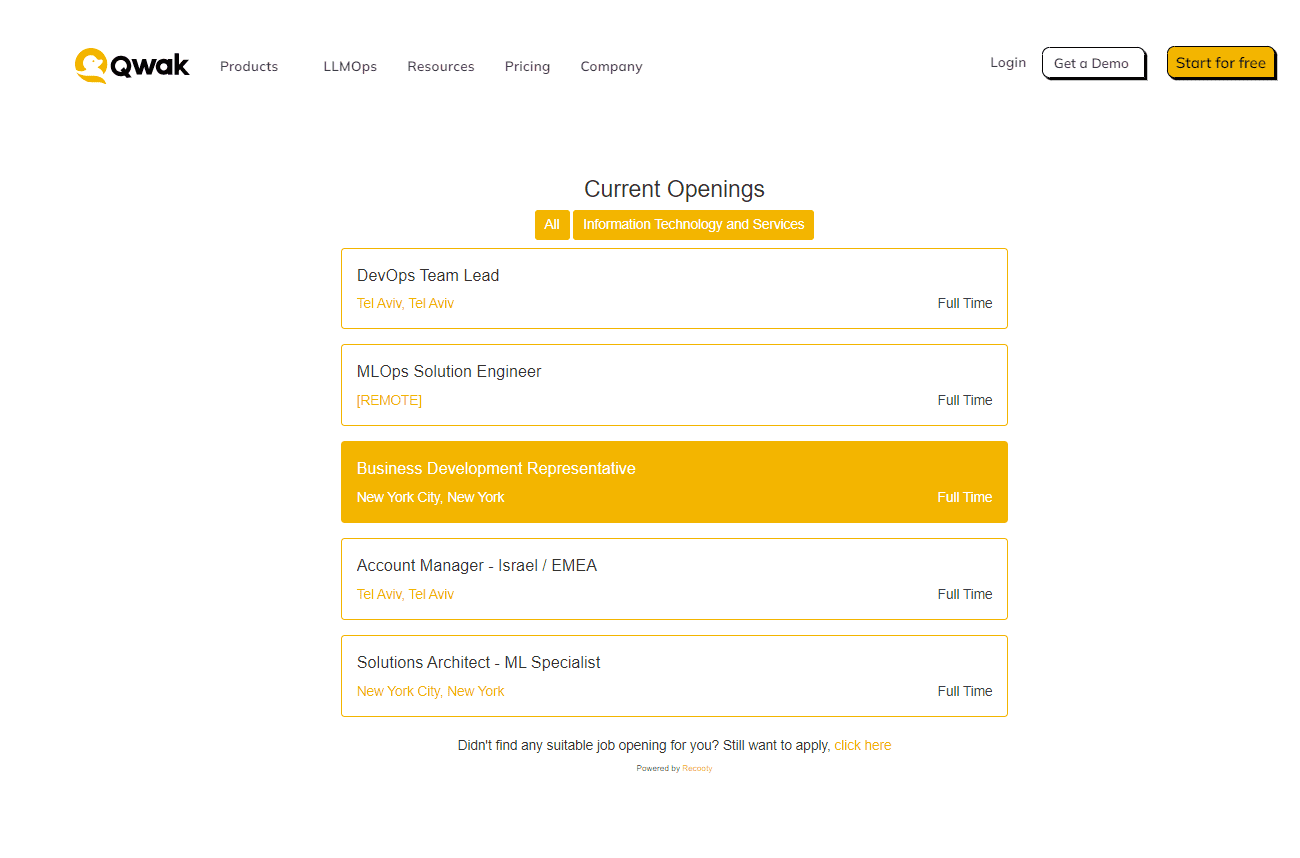
Qwak integrated Recooty’s widget into their career page and showcased job openings on their official website. (Hosted free by Recooty) They customized the design of the career page and aligned it with the brand identity. Qwak used ATS capabilities to track and find the right candidates according to the job openings. The implementation process was quick, took less than two minutes, and no coding was required.
- load faster,
- mobile-responsive, and
- offer a smooth navigation experience
Pull in the Right Candidates:Recooty’s got this knack for grabbing the attention of the exact candidates you’re after. It’s like a talent magnet, drawing in candidates whose qualifications and skills align perfectly with your job openings.
Applications Made Easy:
The career page’s design? Super user-friendly. It’s all about making the application process a breeze for potential candidates. And guess what? Recooty doesn’t stop there. It’s armed with advanced features to keep applicants engaged throughout the hiring process.
ATS Superpowers:
Recooty isn’t just a career page builder; it’s got some serious ATS capabilities. Think tracking, assessing, and managing candidates like a pro. It sorts out the cream of the crop, making your hiring process a well-oiled machine.
Save Time & Money:
Ever heard of a superhero that slashes time and cost per hire by a whopping 70%? Recooty’s got that power. With automation, smart candidate sorting, and an optimized hiring process, it’s a time and cost-saving champion.
Career page SEO and conversion checks competitors often miss
SmartRecruiters separates the careers home page, job-category pages, and individual job pages. Google’s current documentation adds an important operational requirement: JobPosting structured data can help an eligible job page appear in the jobs search experience, but the visible page must accurately describe a real job and expired roles must be handled promptly.
Before publishing a branded careers page, run this short audit:
- Create a stable page for each live role. Use a readable URL and a specific title such as “Customer Support Manager, Manchester” rather than a generic “Job 1234” label. Link each role from the careers hub and relevant team or location pages.
- Make the important facts visible in HTML. Do not hide the job title, location, work model, employment type, salary, requirements, or application instructions inside an image or video. This helps candidates scan the page and gives search systems clearer facts to interpret.
- Align structured data with the page. Follow Google’s JobPosting structured data guidance. Use accurate
datePosted,validThrough, employer, location, employment type, and application details. Structured data does not compensate for thin or misleading job content. - Close jobs deliberately. Google says an unavailable job should have an expired
validThroughvalue, be removed with a 404 or 410 response, or have JobPosting markup removed. Keep a useful closed-role message only when it helps candidates reach similar open roles. - Reduce application friction. Test the full journey on a phone and in a private browser. Count the number of screens, required fields, account prompts, uploads, and confirmation steps. A branded careers page loses trust when the experience changes suddenly to an unrelated form or asks for information that is not needed at the first stage.
- Check accessibility before launch. Use descriptive headings, labels connected to fields, visible focus states, sufficient contrast, meaningful link text, and error messages that explain how to recover. The W3C forms tutorial is a useful reference for accessible form structure.
- Measure the funnel, not just traffic. Track
completed applications ÷ job-page sessionsas the completion rate, then segment it by device, source, role, location, and form step. This shows whether the problem is visibility, job relevance, trust, or application usability.
Keep the careers page accurate
Your branded careers page should be the source of truth for open roles, rather than a second copy of a job-board feed. Keep one owner for role status, one clear application path, consistent details across the careers hub and job page, and a quick process for closing or updating a role. Recooty users can connect this approach with the guide to integrating an ATS with a careers page and the career page that converts checklist.
Ask a colleague who was not involved in the hiring process to find a suitable role, explain the job in their own words, and submit a test application on mobile. Record every question they ask and every point where they hesitate. Those observations are more useful than adding another generic culture paragraph.
Best hiring software with AI job description generator and auto publish to careers page
Hiring software can combine an AI job description generator with careers-page publishing. Products such as HRBlade, PlanState, Apikuo and DaCodes Recruit describe this as one workflow. Keep generation and publishing as separate decisions because a polished draft can still contain an incorrect requirement, location, salary, employment type, or closing date.
| Workflow stage | Automation can help with | Human approval must confirm |
|---|---|---|
| Role intake | Convert a brief into a draft structure | Outcomes, reporting line, must-have skills and legal requirements |
| Job description | Improve clarity, consistency and inclusive wording | Accuracy, compensation, work model, eligibility and realistic expectations |
| Careers page | Create a job URL, template and structured fields | Visible facts, employer identity, application path and accessibility |
| Distribution | Send the approved listing to boards or social channels | Canonical URL, source tags, audience fit and duplicate control |
| Candidate capture | Parse applications and route them to the ATS | Consent, data minimisation, confirmation message and retention rule |
| Job closure | Remove or expire the listing and markup | Whether the role is actually closed and where candidates should go next |
AI job description generator: keep human approval in the publishing loop
Use the generator to create a first draft from an approved role brief, not to invent the brief. Before publishing, compare the output with the intake record and run a short quality gate:
- Does the title describe the work rather than an internal code?
- Are must-have and trainable skills separated?
- Are location, remote policy, employment type and salary details accurate?
- Does the copy avoid proxy requirements such as an unnecessary degree or years threshold?
- Does the application page collect only information needed at that stage?
- Do the visible page and JobPosting structured data say the same thing?
Google's JobPosting guidance says expired roles need timely handling. A publishing workflow is incomplete if it can create a job in seconds but leaves stale pages or markup live after the role closes. Track validThrough, page status, application status and source tags as one operational record.
Recooty's editorial view: auto-publish is useful only when “publish” means the approved version reaches the right destination with traceable data. A one-click workflow that bypasses review can create a faster route to inaccurate jobs, duplicate listings and candidate distrust.
For the next step, connect this guide to Recooty's company career page, ATS and careers-page integration guide, job description guide, and job-posting mistakes guide.
What should a branded careers page include to convert candidates?
The strongest competitor pages do more than display a logo and a list of vacancies. They connect employer branding to a low-friction application journey. Jobedly puts the value proposition, easy-to-find roles, proof from employees, and mobile application flow at the centre of its current careers-page guidance. EasyApply uses a similar structure, with culture, benefits, testimonials, open roles, the hiring process, and a final call to action. Recruitee adds an important trust layer: candidates need enough honest information to decide whether the company is a good fit before they click Apply.
Use the following candidate-question framework when reviewing your own branded company careers page:
| Candidate question | Information to show | Practical conversion check |
|---|---|---|
| Why should I work here? | A specific employer value proposition, culture evidence, and the type of work the team does | A first-time visitor can explain the employee promise after scanning the opening section |
| Is there a relevant role for me? | Searchable or filterable jobs by team, location, work model, and employment type | A candidate reaches a relevant job in one or two actions |
| What would I actually do? | Outcomes, responsibilities, must-have skills, useful-to-have skills, manager or team context, and success measures | The job description distinguishes essential requirements from preferences |
| What will I receive? | Salary range where available, benefits, flexibility, leave, development, and any eligibility limits | Benefits are specific rather than described only as “competitive” |
| What happens after I apply? | Hiring stages, expected response time, interview format, and a contact or adjustment route | The application page sets expectations before asking for personal information |
| Can I trust this listing? | Posting date, location, employment type, closing date, and a named hiring organisation | Closed roles are removed from the live list and are no longer presented as open |
This framework joins your employer story to the details candidates need before applying. It also helps recruiters find missing information without filling the page with decorative copy.
Make your careers page a reliable hiring destination
Review the page whenever a role, benefit, work model, or hiring step changes. Candidates should be able to understand the opportunity, trust the information, and apply without unnecessary friction. A short monthly check of job status, structured data, accessibility, and application completion can keep the page useful as your hiring needs change.
Frequently Asked Questions
What is the best hiring software with an AI job description generator and auto publish to a careers page?
Choose the platform that keeps the approved role brief, job page, application record, source data and closing status connected. Compare approval controls, page ownership, structured data, accessibility, integrations and total cost rather than choosing on automatic publishing alone.
Should an AI job description generator publish without human review?
No. AI can draft and format a role, but a recruiter or hiring manager should verify outcomes, skills, pay, location, eligibility, work model, application questions and structured data before publishing.
Does every job on a branded careers page need its own URL?
Normally, yes. A stable page for each live role gives candidates a focused destination and lets search engines interpret the job details. Keep the page and markup accurate when the role closes, following Google's JobPosting requirements.
How can I measure branded careers page conversion?
Track source visits, job-detail views, apply starts, completed applications, form-step completion, mobile versus desktop performance and candidate drop-off. Use completed applications ÷ job-page sessions as a simple completion rate, then segment by role and source.
What makes a careers page trustworthy to candidates?
Show specific work, benefits, location or remote rules, compensation where available, hiring steps, response expectations, current openings and a clear privacy or accommodation route. Remove stale jobs and avoid generic culture claims that the page cannot support.
Frequently Asked Questions
What is a Branded Company Careers Page?
A Branded Company Careers Page is a customized webpage showcasing a company’s job openings, culture, and values to attract potential candidates.
Why is a Branded Careers Page important?
It helps create a positive employer brand, provides insights into company culture, and attracts top talent by presenting a compelling and consistent image.
What elements should be included on a Branded Careers Page?
It typically includes job listings, information about company culture, employee testimonials, benefits, and details about the application process.
How does a Branded Careers Page enhance recruitment efforts?
It serves as a powerful recruitment tool by conveying a strong employer brand, making the company more appealing to prospective candidates.
How can a Branded Careers Page improve candidate experience?
By offering transparent information, showcasing the company’s personality, and providing easy navigation, it enhances the overall candidate experience.
What makes a branded careers page convert candidates?
It connects a clear employer value proposition with current, easy-to-filter roles, specific job information, proof of the employee experience, transparent hiring steps, and a short application journey.
Should every job have its own page?
Yes, each live role should normally have a stable, crawlable job page linked from the careers hub. This gives candidates a focused page to share and lets you keep the role’s title, location, requirements, and application details accurate.
Does a branded careers page need JobPosting structured data?
The careers home page does not need JobPosting markup just because it lists jobs. Use the markup on eligible individual job pages, make it match the visible content, and remove or expire it when the role is no longer open. Follow Google’s official JobPosting requirements.
How can I make a careers page accessible and mobile-friendly?
Use semantic headings, labelled fields, keyboard-friendly controls, readable contrast, descriptive links, responsive layouts, and a test application that works without unnecessary account creation. Review the full journey on a phone, including search, job details, uploads, errors, and confirmation.
Which metrics should I track on a branded careers page?
Track visits by source and device, job-detail views, apply starts, completed applications, form-step drop-off, time to complete, and the share of roles with stale or missing information. These metrics show where the hiring funnel needs attention.
Source: https://recooty.com/blog/create-your-branded-careers-page/
Practical recruiting playbooks, HR tutorials and hiring trends from the team behind Recooty — hiring software for growing teams.


