How to Post a Job on Craigslist in 6 Simple Steps (2026)
Learn how to effectively post a job on Craigslist with our step-by-step guide. Attract top talent with these proven strategies!


CONTENTS
- 00Introduction
- 01Why Use Craigslist for Your Next Job Ad?
- The Recooty Advantage for Craigslist Hiring
- 02How to Post a Job on Craigslist in 6 Simple Steps (2026)
- Step 1: Create a Craigslist Account & Login
- Step 2: Choose the Correct Location
- Step 3: Select “Job Offered” and Your Category
- Step 4: Write a High-Converting Job Ad
- Step 5: Provide Contact Info + Include Application Link
- Step 6: Payment, Posting & Post Management
- 03Current Craigslist fees and posting rules
- Craigslist quality-control checklist
- 04How Recooty Helps Lower Craigslist Job Posting Costs
- 05Customization Tips for Posting a Job on Craigslist in 2026
- 06Customize Your Craigslist Job Posting: Best Practices That Work
- Tailor Job Titles for Search Visibility
- Modify Descriptions to Reflect Local Culture or Needs
- Add Visual Elements Using Simple HTML Tags
- Highlight Compensation, Schedules & Perks
- Customize Apply Method Using ATS Integration (Like Recooty)
- Adjust Posting Time for Local Activity Peak
- Personalize Tone Based on Role and Region
- A/B Test Titles or Descriptions
- 07Final Thoughts: Customize to Convert
- 08Common Issues & Troubleshooting When Posting a Job on Craigslist (2026)
- Ghosted or Invisible Ads After Posting
- Flagged or Removed Ads
- Craigslist Posting Login Issues
- Phone Number or Email Not Verified
- Duplicate or Expired Ads
- Payment Issues & Errors at Checkout
- General Pro Tips to Avoid Craigslist Posting Issues
- 09Craigslist, recruitment software, and the compliant workflow
- 10Conclusion
- 11Frequently Asked Questions
- 12Additional Resources on Job Posting:
Craigslist can work well for local, hourly, trade, service, and community roles. To post a job, create or use an account, choose the correct local site and category, write a specific ad, add an approved application route, and pay the local fee when one applies.
U.S. job-category fees currently range from $10 to $75 depending on the area. Some regions and categories have different rules, so check the live Craigslist fee page before you budget. This guide covers the six posting steps, quality checks, and a hiring workflow for managing responses.
Why Use Craigslist for Your Next Job Ad?
Craigslist remains useful when location matters and candidates search for local work. It is less suitable when you need a national specialist audience or a complex employer-branding experience.
Recruitment software can help your team track applications, source data, screening questions, interview feedback, and follow-up. Keep the Craigslist post local and compliant, and confirm that any integration or posting method is authorized.
The Recooty Advantage for Craigslist Hiring
Posting directly on Craigslist can be time-consuming when you have many applicants. Recooty can provide a central place for applications, screening, and hiring-team follow-up. Confirm the available integration and Craigslist’s current rules before using automation.
By the End of This Guide, You’ll Know:
- How to post a job on Craigslist for free (when possible)
- How to avoid common Craigslist posting errors
- Tools you can use to manage and streamline the posting process
- Location-specific steps for Craigslist in California and Texas
How to Post a Job on Craigslist in 6 Simple Steps (2026)
The safest process is simple: use one accurate local location, choose the category that matches the role, and keep the ad specific and honest. The steps below apply whether the local site charges a fee or allows a free listing.
Let’s dive in.
Step 1: Create a Craigslist Account & Login
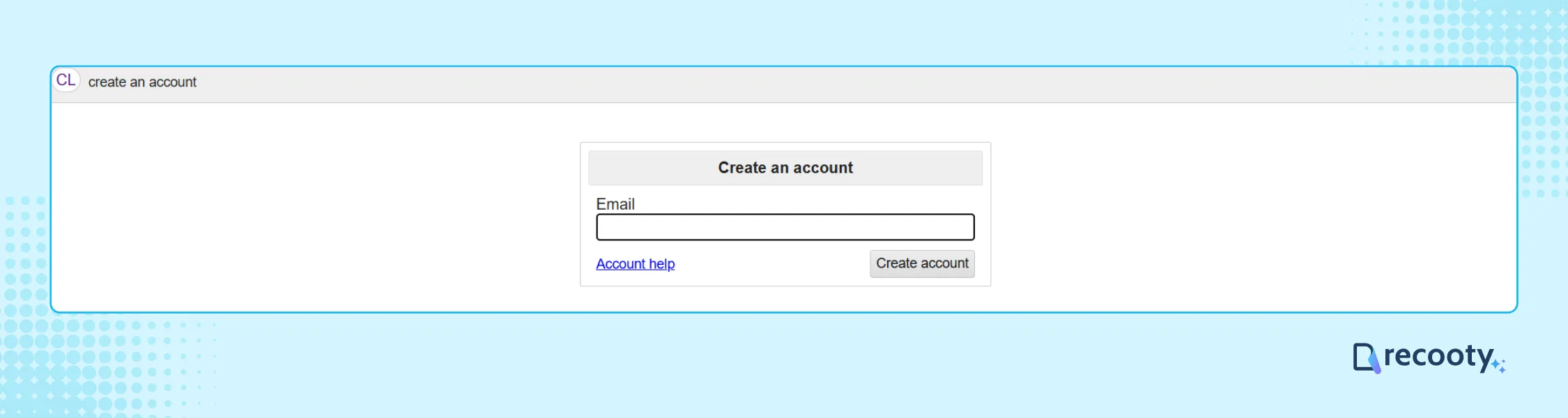
Creating an account is useful for posting job ads because it gives you post history and makes updates easier. A one-off post may follow a different flow, so check the local site.
Why it matters
- Helps manage multiple listings.
- Easier renewals or updates.
- Prevents email verification every time.
- Ensures consistency in your brand voice.
What to do
- Visit your local Craigslist (e.g., https://www.craigslist.org/area/sfbay for California).
- Click “My Account” and create a posting account using your email.
- Confirm your email address and verify your phone.
- Use this page to return to your postings anytime: Craigslist job posting login.
Tip: Use the email your hiring team monitors and keep candidate responses in the approved hiring workflow.
Step 2: Choose the Correct Location
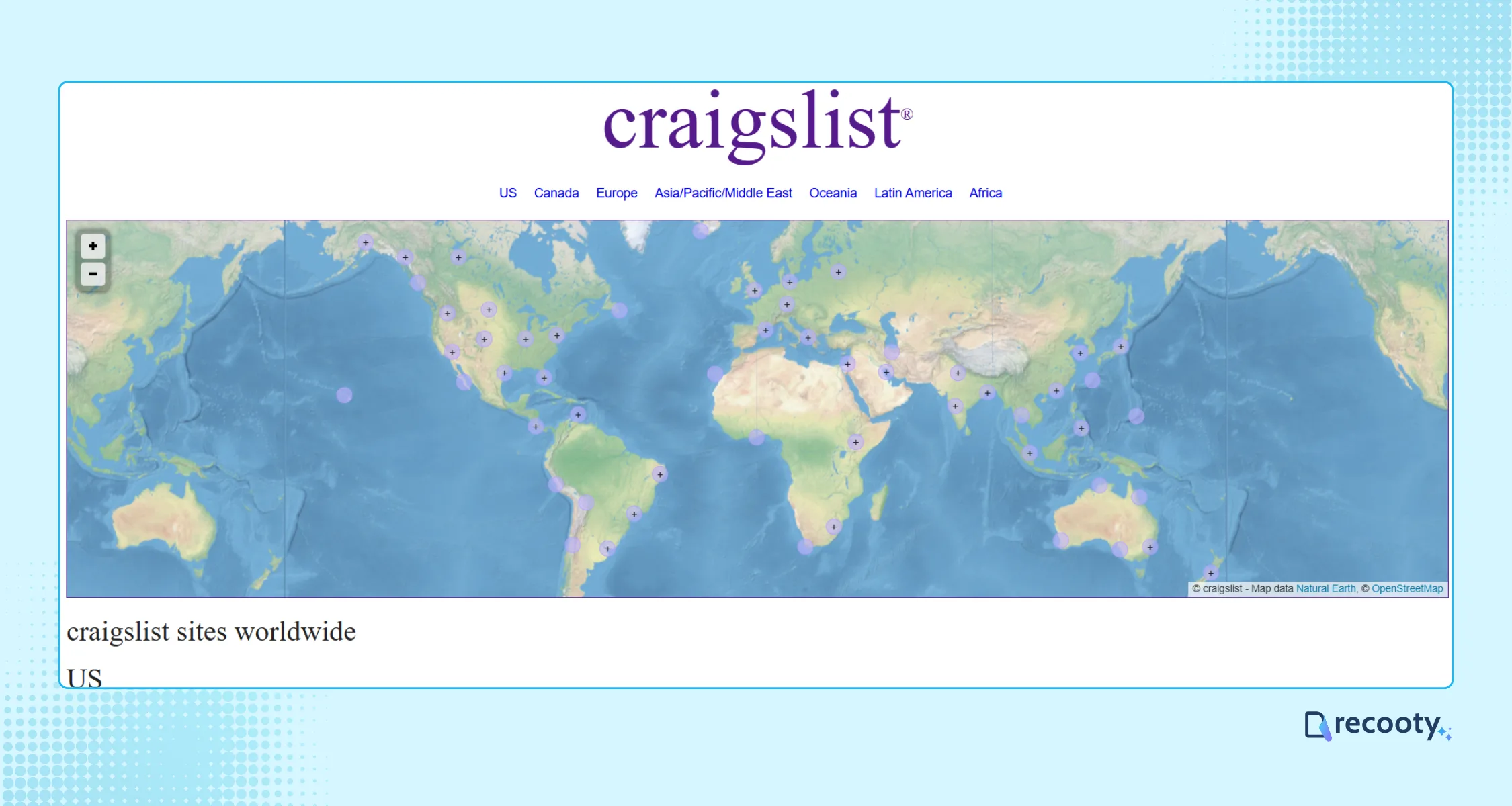
The location you pick directly impacts post performance. Craigslist has over 700 local subdomains, which means you must post in the specific city or subregion where your job is based.
Why location matters
- Your job will only appear in the selected area.
- Posting in broader locations or nearby cities can lead to “ghosted” posts or flagging.
Helpful examples
- For California-based hiring: Visit https://geo.craigslist.org/iso/us/ca, and select a city like San Jose or Oakland.
- For Texas roles: Go to https://www.craigslist.org/area/dallas or https://www.craigslist.org/area/houston
- Want to post jobs for free on Craigslist near me? Use your regional Craigslist mirror.
Want to cover multiple cities? Create only the local posts that Craigslist permits. Use recruitment software to compare sources and manage candidates, not to bypass local posting rules.
Step 3: Select “Job Offered” and Your Category
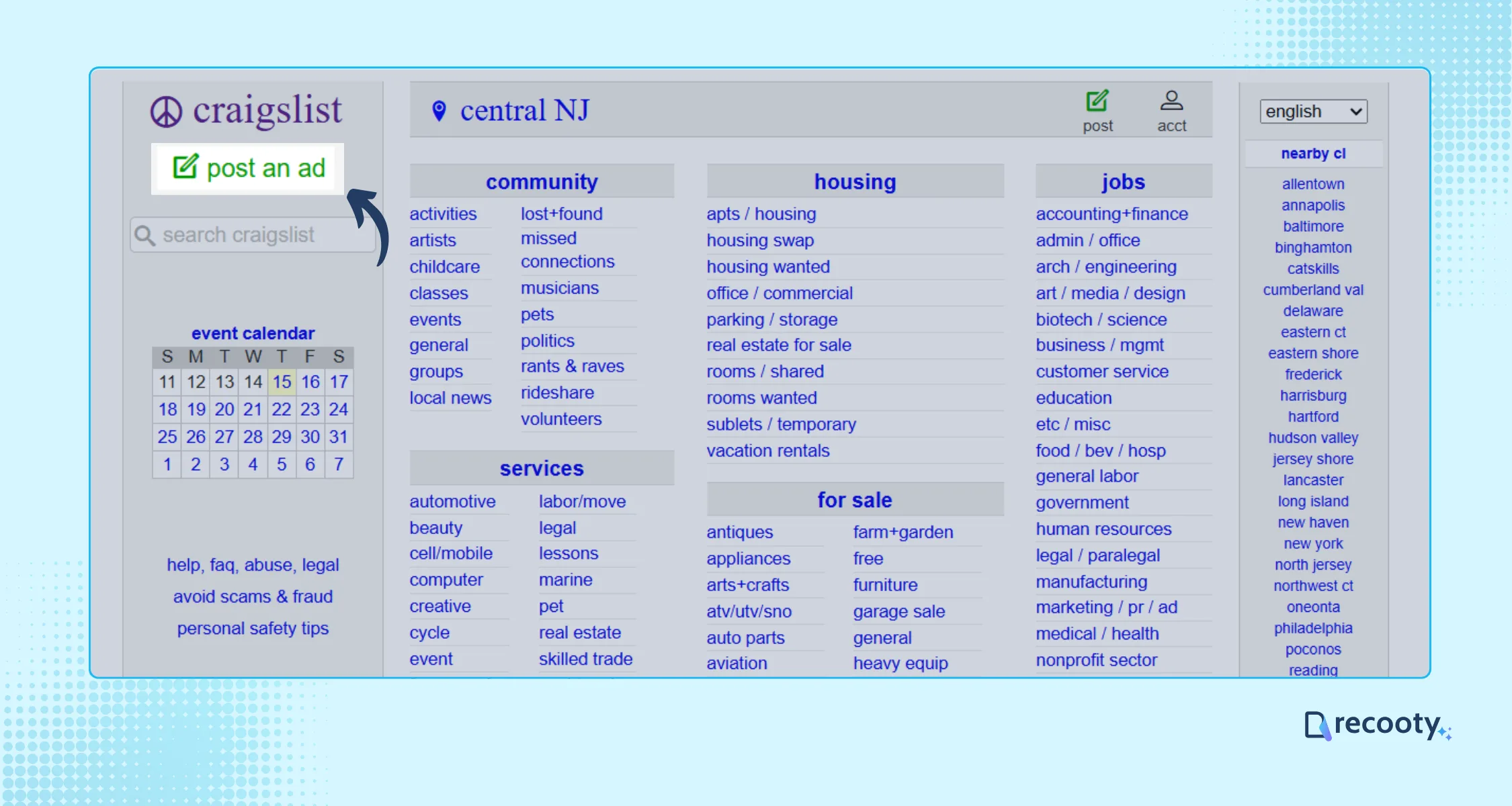
After clicking “Create a Posting,” Craigslist will ask what type of listing you’re making. Choose “Job Offered” if you’re hiring.
Common job categories
- Admin / Office
- Customer Service
- Retail / Wholesale
- Skilled Trades / Labor
- Food / Bev / Hospitality
Choosing the most accurate category not only improves visibility but also keeps your post compliant with Craigslist’s guidelines.
Mistake to avoid: Don’t post in “Gigs” or general listings if the role involves recurring work. Craigslist may remove it.
Choosing a category
- For contractors or hourly roles, choose a category such as Trades, Labor, or Driver.
- For W-2 based positions, choose the standard employment category.
Step 4: Write a High-Converting Job Ad
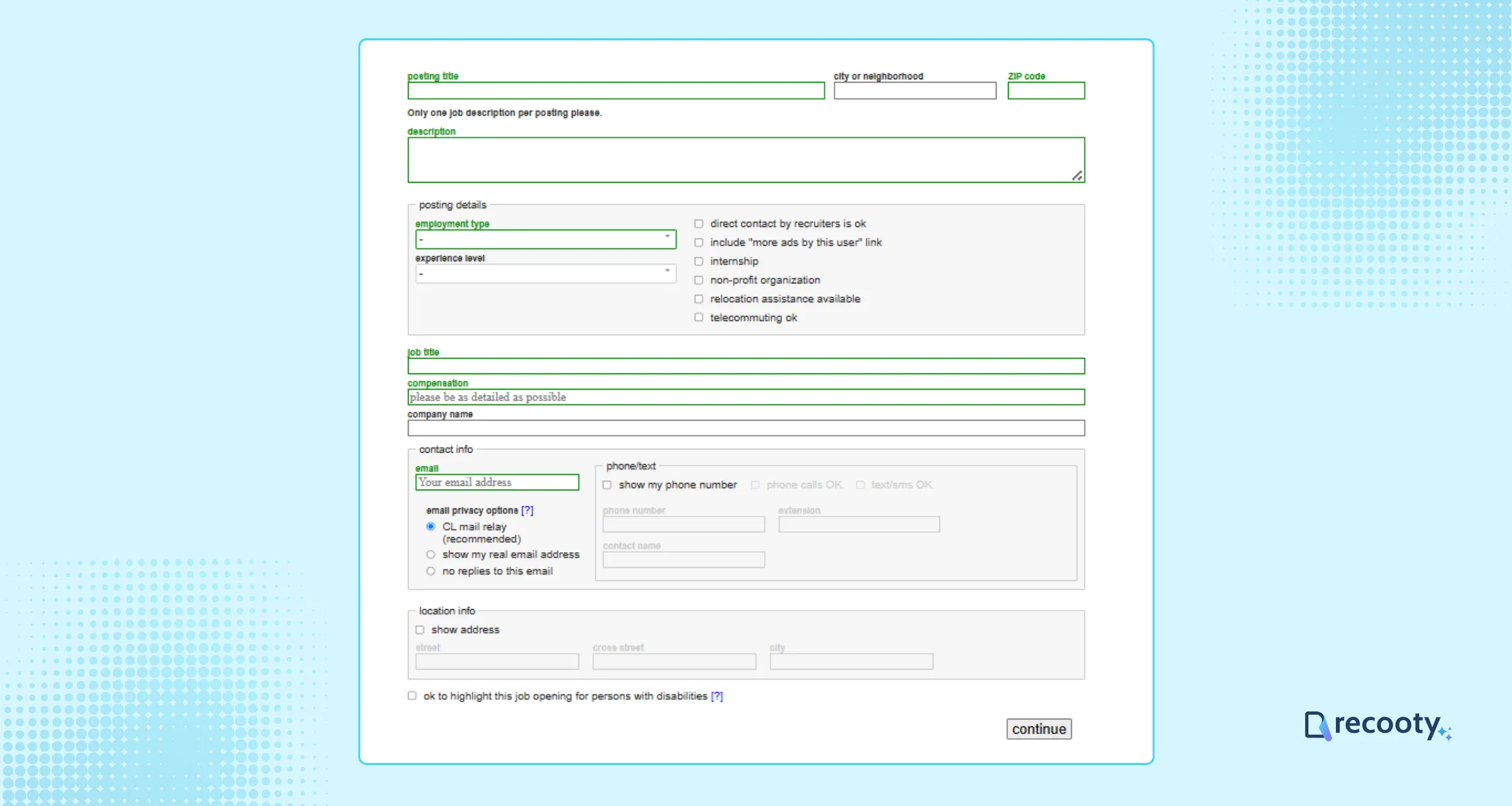
This is where the listing either sets clear expectations or creates avoidable questions. Keep the copy clear, compliant, and easy to scan.
Elements of a clear Craigslist job ad
- A clear, search-friendly job title: ex. “Warehouse Associate – Night Shift (Oakland)”
- Honest, inclusive job description.
- Pay transparency (include hourly/salary rates).
- Schedule, location details, clear application instructions.
- Use the ordinary job title and location terms candidates would search for. Avoid unrelated keyword stuffing.
Copy Example:
- Position: Warehouse Associate (Night Shift)
- Location: Oakland, CA
- Pay: $18/hr + bonuses
- Hours: 6 PM to 2 AM, Monday to Friday
- To apply: Reply to this post with your resume or apply directly here
Tip: Use a consistent template, then review qualified applications rather than raw clicks.
Step 5: Provide Contact Info + Include Application Link
For privacy, Craigslist uses an “email relay system.” Instead of showing your actual email, it masks your contact. Replies go to your email while filtering out spam.
Application options
- Use Craigslist’s reply email.
- Include a direct ATS application link (e.g., through Recooty).
- Add screening questions to qualify candidates.
Best Practice: Use the approved reply route or a clearly disclosed application link. If you use an ATS, record Craigslist as the source and make sure the method complies with Craigslist’s rules.
Step 6: Payment, Posting & Post Management
Most U.S. job ads are paid listings, with current fees ranging from $10 to $75 by area and category. Check the Craigslist posting-fee page during setup because local charges and payment options can change.
After submission, follow the local confirmation instructions. Paid postings generally appear in index pages and search results within 10 to 20 minutes, according to Craigslist’s job FAQ. Keep the confirmation email and use your account or approved management page to edit, renew, or remove the post.
Current Craigslist fees and posting rules
Craigslist’s official fee page currently says job categories in the United States and parts of Canada cost $10 to $75, with the fee varying by area. It also says paid posting accounts may provide additional payment options for high-volume posters. Check the official Craigslist posting-fee page.
The official job-posting instructions say to choose the correct local site, select “job offered,” choose the category, and note that each selected job category can incur a fee. Paid job postings generally appear in index pages and search results 10 to 20 minutes after submission, according to Craigslist’s job FAQ. See the posting instructions and job FAQ.
Do not use a broad location to reach people elsewhere, duplicate the same ad across nearby cities, add search terms that do not describe the role, or use an unapproved posting agent. The safest way to scale is to keep the Craigslist post local and truthful, then use an approved application link or recruitment workflow for screening and follow-up.
Craigslist quality-control checklist
- One role, one accurate local location, and one clear category.
- Company name, job duties, pay or pay range, schedule, work pattern, and application method.
- No protected-class preferences, misleading income claims, keyword spam, or bait-and-switch language.
- No duplicate or near-duplicate posts that violate local posting rules.
- No collection or export of candidate information beyond a lawful, disclosed hiring purpose.
- A review date for cost per qualified applicant and candidate quality.
How Recooty Helps Lower Craigslist Job Posting Costs
Hiring on Craigslist can create extra work when several people review applications. Recooty can help teams track sourcing and applicants in one workflow, subject to the available integration and Craigslist’s rules.
What Recooty can do
- Create one job record and distribute it to supported job boards.
- Provide a centralized dashboard to track applicants.
- Enable custom-branded careers pages.
- Host direct apply links that collect resumes instantly.
Check the current Recooty Pricing page for plans and supported job-board connections before budgeting.

Customization Tips for Posting a Job on Craigslist in 2026
The same job copy will not fit every local market. Tailoring the title, location details, schedule, pay, and application route can make the listing easier for the right candidates to assess.
Whether you’re trying to post jobs for free on Craigslist near California or want to stand out in competitive cities like Dallas, these tips will help.
Customize Your Craigslist Job Posting: Best Practices That Work
01Tailor Job Titles for Search Visibility
Most candidates search for straightforward roles like “Retail Associate” or “Line Cook,” not flashy titles like “Customer Experience Ninja.”
Clear, industry-standard job titles help candidates understand the role quickly.
- Use SEO-friendly titles (e.g., “Warehouse Associate – Night Shift – San Antonio”).
- Avoid using internal role names or acronyms.
Tip: Include keywords people actually search like “driver,” “admin,” or “teacher.” More effective Craigslist job posting for employers starts with being searchable.
02Modify Descriptions to Reflect Local Culture or Needs
When the location matters, mention useful local context such as a neighborhood, transit route, or worksite access. Keep the detail accurate and relevant to the job.
Customize with:
- Local lingo (“DFW area,” “Bay Area,” “Galleria Houston”)
- Accessibility info (“near BART” or “on Route 10 bus line”)
- Climate-specific benefits (“indoor, climate-controlled environment”)
03Add Visual Elements Using Simple HTML Tags
Craigslist allows basic HTML formatting. I’ve used bullets (), bold (), and paragraph tags to make posts much easier to scan.
Clean formatting improves readability and conveys professionalism.
Example:
- Pay: $18/hr + tips
- Hours: Monday–Friday, 8 AM–5 PM
- Location: Near Downtown San Diego
Tip: Avoid over-formatting or flashy colors—Craigslist may flag it as spam.
04Highlight Compensation, Schedules & Perks
According to Workstream, job seekers are more likely to engage when ads clearly list the pay range and work schedule.
State whether pay is hourly or salaried and list relevant benefits such as paid time off or bonus eligibility.
Example:
- Compensation: $16/hour + paid overtime
- Schedule: 4-day workweek (10-hour shifts)
Bonuses: Quarterly performance-based incentive
Craigslist’s updated posting standards now favor ads with clear wage and role expectations. Adds credibility and filters disinterested eyes.
05Customize Apply Method Using ATS Integration (Like Recooty)
Employers can use Craigslist’s reply email or a clearly disclosed ATS application link. An ATS can route applicants to a branded page and keep screening records together when that workflow is permitted.
Instead of:
“Email your resume to [masked address]”
Example: Apply here: yourcompany.recooty.com
Recooty lets me modify the pipeline and screening questions per Craigslist post.
When hiring in multiple locations, this method can help your team keep applications separated by source and location.
06Adjust Posting Time for Local Activity Peak
Timing can affect how quickly a local audience sees a post. If you have enough applications to compare, test weekday morning and afternoon publication windows.
That’s when most job seekers are actively browsing and open to responding.
Best days to post job ads on Craigslist:
- Tuesday (top performance)
- Wednesday (midweek seekers)
- Monday (if urgent roles)
Avoid late nights and weekends unless you’re targeting hospitality or delivery roles.
07Personalize Tone Based on Role and Region
One key thing I’ve learned: the language used in your post should reflect the tone of your brand AND what resonates with local candidates.
Examples:
Tech job near Austin? Use a casual, friendly tone with emphasis on culture.
Healthcare job near Dallas? Go more formal and focus on compliance, shift expectations.
Avoid generic descriptions. Say “We’re a fast-growing café in downtown Dallas” instead of “We are hiring for a café position.”
Want to add personality without losing professionalism? Call out your mission or note your company values.
08A/B Test Titles or Descriptions
Craigslist may not let you edit a post’s title once it is live. You can create permitted variants for different neighborhoods or renew a post with improved copy based on performance data.
For example, compare:
- “Line Cook – No Late Hours, Great Tips” vs
- “Café Line Cook – $17/hr, 4-Day Week” in the same city
Track qualified applications and interview conversion for each version. UTM links or approved source tags can show which ad produces better candidates.
Final Thoughts: Customize to Convert
Craigslist still rewards clear, local, role-specific ads. Location details and a straightforward application route can improve the relevance of responses.
Whether you are exploring free posting options, tailoring an ad for Dallas or Oakland, or hiring at volume, treat Craigslist as a channel that needs clear tracking and local copy.
Personalized job ads are more respected, are less likely to be flagged, and get real, local attention.
Common Issues & Troubleshooting When Posting a Job on Craigslist (2026)
Even after you follow the six steps, a post can be delayed, flagged, or hidden. The checks below cover the most common causes.
From ghosted ads to flagged content, there are a number of common hang-ups that Craigslist employers face. If you’re trying to post jobs for free on Craigslist near California or Texas and hit a wall, this section is for you.
The checks below draw on Craigslist’s Help Center and common posting problems. Use them to spot issues early and correct the cause before reposting.
1. Ghosted or Invisible Ads After Posting
One of the most frustrating issues: You click “publish,” but your ad never appears live. Craigslist calls this a “ghosted” ad.
Why it happens
- You posted too frequently in the same category or city (Craigslist sees it as spam).
- Your account isn’t phone verified.
- Content looks copy-pasted or overly promotional (triggering filters).
- Duplicate or near-identical job ads.
How to troubleshoot it
- I waited 48 hours (ghosted ads may still get reviewed manually).
- Switched up the job title slightly—avoiding repetition.
- Reformatted and trimmed down long job descriptions.
- Added more local and legitimate info (landmarks, neighbourhood names).
Tip: Avoid exact-matching titles or content across cities like San Diego and Los Angeles. Use unique versions for each.
2. Flagged or Removed Ads
Craigslist users can flag job listings, and repeated flags may lead to removal.
Why ads get flagged
- Posting too frequently or cross-posting in multiple regions.
- Using language that sounds like a scam (e.g., “work from home/make $5,000 a week”).
- Violating Craigslist’s Terms of Use (e.g., link spamming, multiple offers in one ad).
- Aggressively formatted content: colored fonts, emojis, or JavaScript.
Promotional phrases such as “unlimited commissions” and multiple unrelated links can make an ad look misleading or promotional.
How to troubleshoot
- Reread and revise the post: Remove promotional-sounding phrases.
- Ensure one job per post.
- Repost with cleaner formatting (no bold headlines across every line).
- Space out reposting by at least 72 hours if reusing similar content. Craigslist support may not manually remove flags, so keep the original post compliant.
3. Craigslist Posting Login Issues
Login problems can block access to the posting dashboard and slow hiring.
Common causes
- Password reset not working.
- Account temporarily locked due to suspicious behavior.
- Using an unverified or blocked email.
Here’s what worked for me:
- Access your Craigslist job posting login at: accounts.craigslist.org/login
- Use incognito mode if login session seems stuck.
- Reset your password (watch out for email delays in Gmail/Outlook spam folders).
- Contact Craigslist using their support form: Craigslist Support
Tip: Always post from the same device and IP address when managing multiple listings. New IPs can trigger login blocks.
4. Phone Number or Email Not Verified
Most U.S. job postings require phone verification. Check the local posting flow for the current requirement.
What to know
- Craigslist requires SMS or voice-call verification before most job posts.
- Unverified ads may not go live or may be delayed when the system detects unusual activity.
Practical check:
- Use a dedicated hiring phone where possible, and avoid unsupported VoIP numbers.
- Verified once → then used Recooty for the rest, posting apply links instead of full listings wherever possible.
5. Duplicate or Expired Ads
Craigslist isn’t a fan of reposts without edits. If you’ve posted the same job in multiple cities or within short timeframes, duplicate detection hits hard.
Common mistake
Reusing the same title and description across several cities can trigger duplicate-posting controls.
How to Avoid:
- Change at least 25% of job content before reposting.
- Wait at least 48–72 hours before reusing title.
- Edit job details like location reference, compensation format, or benefits.
6. Payment Issues & Errors at Checkout
Craigslist charges between $10 and $75 per job in many U.S. areas. Billing errors can still occur during checkout.
Common checkout issues
- “Transaction cannot be processed” at checkout
- Card declines despite having funds
- Craigslist blocked my prepaid card
Fixes That Worked:
- Used Chrome browser (Craigslist checkout prefers Chromium browsers).
- Avoided prepaid and used business credit card.
- Cleared cookies before retrying.
Tip: If you’re posting jobs for free on Craigslist near regions outside the U.S., the payment screen may not even appear—but verify the listing area first.
General Pro Tips to Avoid Craigslist Posting Issues
Here’s my go-to checklist to reduce errors:
- Verify phone + email before starting.
- Use HTML formatting wisely and avoid over-formatting.
- Don’t copy-paste identical ads.
- Space posts apart by time and region.
- Avoid flags: Stay EEO-friendly, local-based, and role-specific.
- Always preview your post first. Typos and unclear claims can make an ad look misleading.
Clear, honest, well-formatted, locally tailored ads reduce avoidable posting problems. If an ad disappears or is flagged, review the local rules before reposting.
Craigslist, recruitment software, and the compliant workflow
Craigslist can generate local responses, while recruitment software can organize applications, screening questions, interview feedback, source tracking, and follow-up. Keep those roles separate unless Craigslist has expressly authorized the integration or posting method. Craigslist’s terms restrict unauthorized posting agents, harvesting user information, spam, keyword spam, overposting, cross-posting, nonlocal content, and posts whose primary purpose is to drive traffic to a website. Read Craigslist’s terms of use and prohibited-content guidance.
| Hiring goal | Craigslist role | Recruitment software role | Proof to track |
|---|---|---|---|
| Local reach | Publish one accurate local job post | Capture source and manage applicants | Qualified applications by city |
| Faster screening | State must-have requirements and screening questions | Apply the same rubric to every applicant | Screen-to-interview rate |
| Lower admin effort | Use the approved reply method | Schedule, remind, and store feedback | Time spent per qualified applicant |
| Multiple locations | Create only permitted, genuinely local posts | Compare sources without duplicate records | Cost and quality by location |
| Better hiring quality | Set realistic pay, schedule, and work details | Record offer and retention outcomes | Offer acceptance and 90-day retention |
Conclusion
Use one accurate local site, select the correct category, describe the role and pay clearly, and give candidates a direct application route. Check the local fee and posting rules before publishing, then track qualified applications rather than response volume alone.
1. Select the right location and category. Choose the Craigslist city and job category that match the role.
2. Write a clear job description. Include the title, location, compensation, schedule, duties, and requirements.
3. Provide an approved application route. Craigslist’s email relay can protect your direct address, while an approved application link can help your team screen candidates.
4. Check fees and duration. Most U.S. job categories are listed at $10 to $75 depending on the area. Confirm the local terms.
5. Monitor applications. Check the reply inbox or application system regularly and record the source, screening decision, interview stage, and outcome.
Frequently Asked Questions
Can I post a job on Craigslist for free?
Some Craigslist postings are free, but U.S. job categories and parts of Canada are generally paid and currently listed at $10 to $75 depending on area. The fee appears during the posting flow, so check the official fee page and local site before assuming a post is free.
How much does a Craigslist job post cost?
Craigslist’s current official fee page lists $10 to $75 for job categories in the United States and parts of Canada, with area-specific pricing. Each selected category may incur a fee. Do not rely on a universal price range for every city.
Can an ATS automatically post jobs to Craigslist?
Only use an integration or posting method that Craigslist authorizes. Craigslist’s terms restrict unauthorized posting agents and related automated activity. A safer workflow is to use Craigslist for the approved post and use recruitment software to capture applications, record the source, screen candidates, and manage communication.
Why was my Craigslist job post flagged or removed?
Common causes include duplicate or overposted content, a nonlocal location, keyword spam, misleading or deceptive claims, prohibited services, an unclear category, or an application link that makes the post primarily a traffic-driving promotion. Review Craigslist’s terms, prohibited-content page, and local posting rules before reposting.
How do I create a job on Craigslist?
To create a job listing, visit Craigslist, set up an account, select your location, and click “Post an ad.” Fill in the job details, select the category, complete payment when required, and follow the confirmation instructions.
How long does it take for a posting to go live?
Paid postings can take 10-20 minutes to appear, while free postings may take about 15 minutes after email confirmation.
How often can I post on Craigslist?
You can post in one category per city once every 48 hours. Posting a similar ad too soon may lead to a blocked message.
What does it cost to post a job on Craigslist?
Craigslist job posting costs vary by location; in the U.S., fees range from $10 to $75 with no free options, while some regions outside the U.S. allow free listings.
Additional Resources on Job Posting:
Source: https://recooty.com/blog/how-to-post-a-job-on-craigslist/
Practical recruiting playbooks, HR tutorials and hiring trends from the team behind Recooty — hiring software for growing teams.


