How to Post a Job on Jobserve
Learn how to post a job on Jobserve with this step-by-step guide. Discover pricing, job posting tips, and how to attract the right candidates.


CONTENTS
- 00Introduction
- 01Key takeaways
- 02What is JobServe?
- 03What services do you get with JobServe?
- 04How to post a job with JobServe
- Step 1: Register as an advertiser
- Step 2: Start creating the advert
- Step 3: Review your job posting
- Step 4: Select a plan and publish
- 05How much does it cost to post on JobServe?
- 06JobServe job-post fields that improve matching
- 07Recruitment software and JobServe: choose the right distribution model
- 08Conclusion: publish a clearer JobServe advert
- 09Frequently Asked Questions
- 10Additional Resources on Job Posting
JobServe is a specialist channel for technology, engineering, and contract recruitment. To post a job, register as an advertiser, enter the role and matching details, review the advert, select a product, and publish it. The right product depends on whether you have one vacancy, recurring hiring, or a larger credit requirement, so check the regional price page before you pay.

Key takeaways
- Use JobServe when the role needs specialist technical reach and candidates search by skills, location, contract type, or rate.
- Quick Post suits a one-off vacancy; Lifetime Credits and Monthly Credits suit teams with a larger or recurring requirement. JobServe also lists pay-for-performance options in some markets.
- A complete advert names the title, core skills, responsibilities, location, work pattern, rate or salary, contract length, and application route.
- Use recruitment software when you need one record for candidates from JobServe and other sources, with shared screening, interview feedback, and source reporting.
- Judge the channel by qualified applicants and hiring outcomes rather than raw advert views.
What is JobServe?
JobServe is a job-search and recruitment service with a strong technology and contract-hiring audience. Candidates can search current roles and receive alerts that match their chosen skills and locations. That makes accurate fields important: the data you enter affects how the role is matched and how an applicant understands the opportunity.
What services do you get with JobServe?
JobServe’s advertiser products vary by market. The official advertiser FAQ describes Quick Post for one-off hiring, Lifetime Credits for larger requirements, and Monthly Credits for recurring budget control. The regional price list shows different currencies and products, while the U.S. posting page displays dollar pricing. Select the market and product shown in your own account before relying on a price.
How to post a job with JobServe
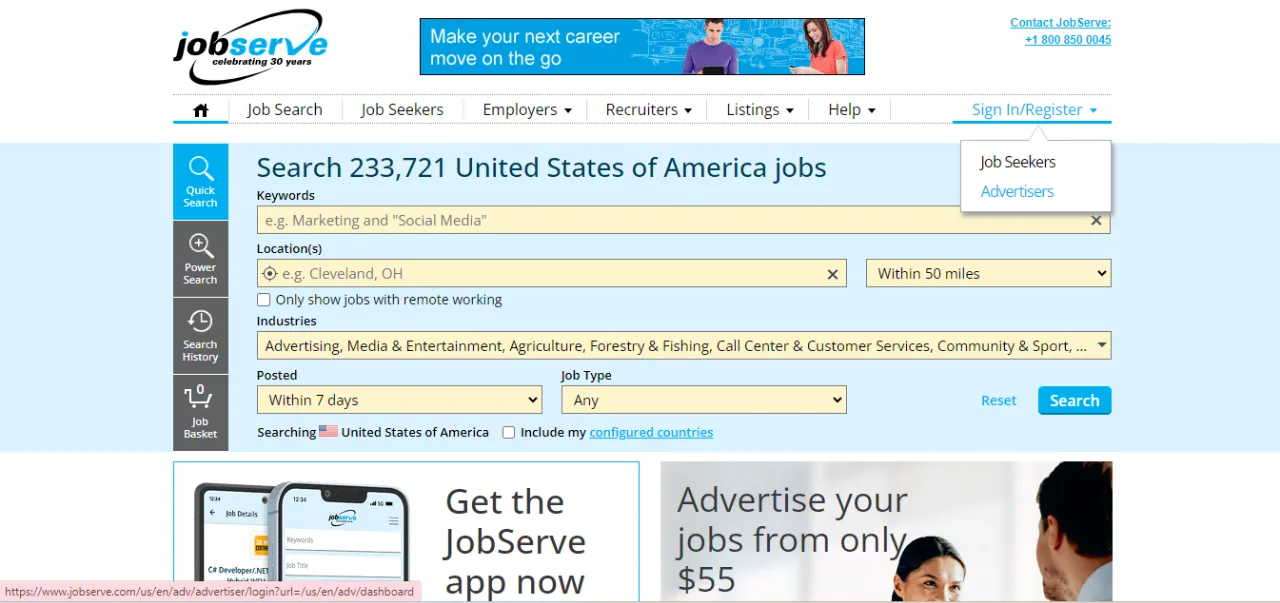
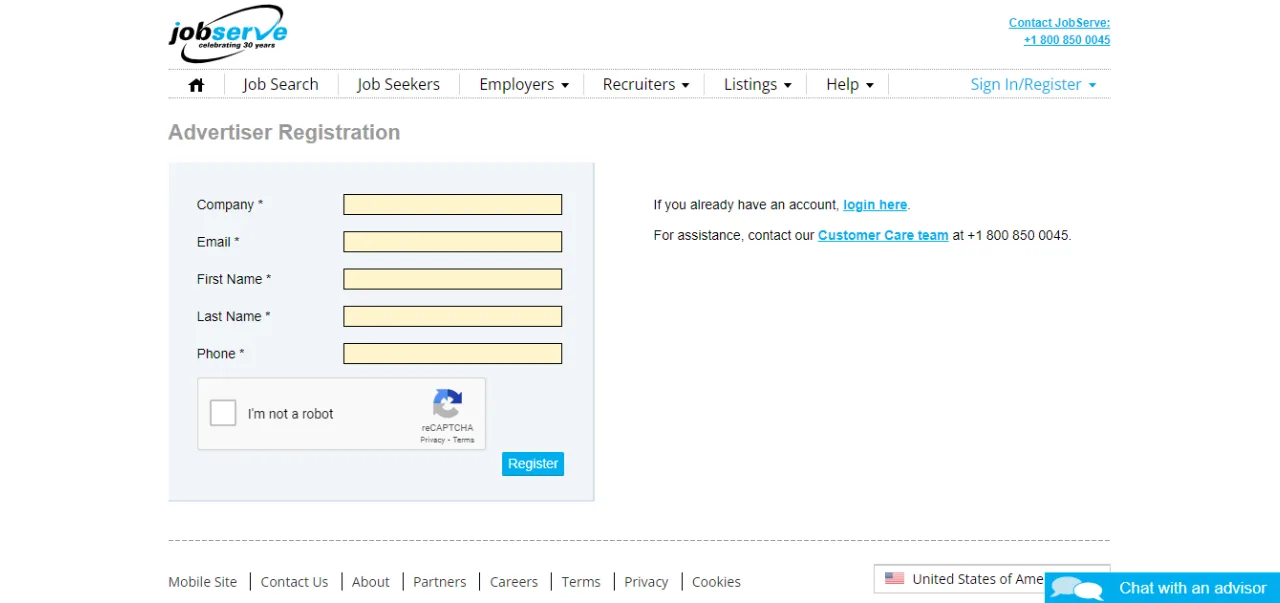
Step 1: Register as an advertiser
Open the JobServe advertiser area and create an account with a work email and company details. Keep your company name, contact information, website, and billing details ready. A verified advertiser profile helps candidates recognise who will receive their application.
Step 2: Start creating the advert
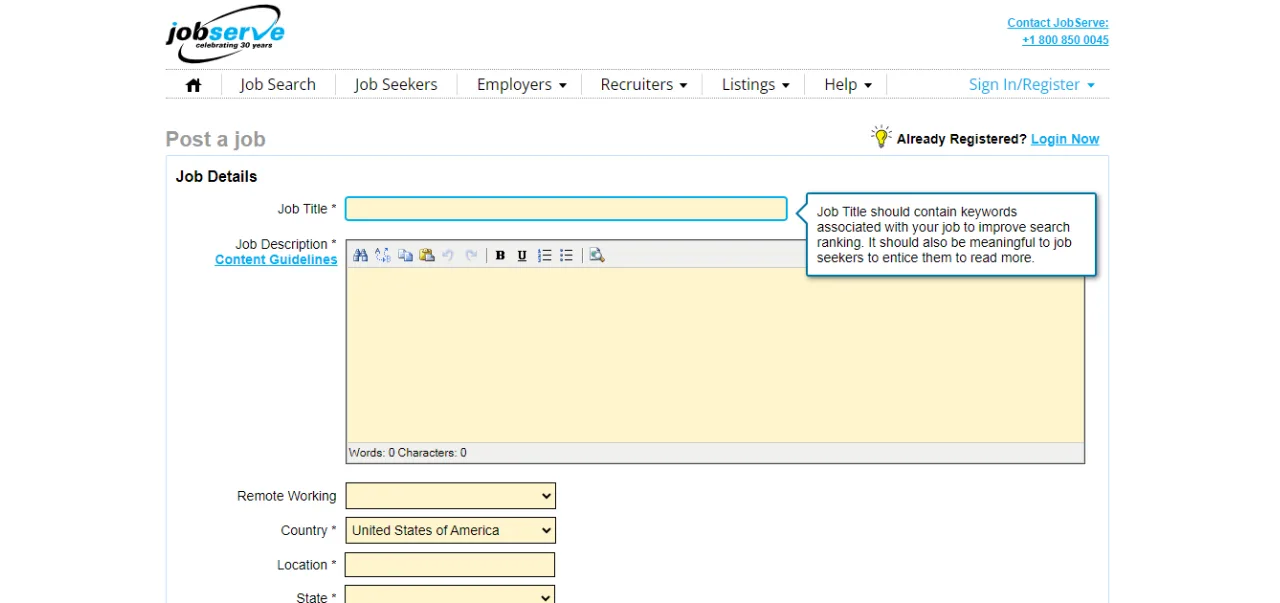
Use the JobServe job-post form or the relevant regional advertiser link. You can also review the U.S. JobServe search page to understand how candidates see technical roles. Enter the job title and then complete the fields in the order presented.
Include:
- the standard title candidates search for;
- the required technologies, certifications, and experience;
- the project context and day-to-day responsibilities;
- the location, remote or hybrid arrangement, time zone, and travel expectations;
- the contract length, start date, rate or salary, and working hours; and
- the application method and the information candidates should submit.
If you want help with a first draft, Recooty’s job description generator can organise the sections. Have the hiring manager check that each requirement is genuine before publishing.
Step 3: Review your job posting
Read the advert as a candidate would. Replace internal abbreviations, check the rate and location, and remove requirements that are not part of the work. Confirm that the contact or application link works on a phone. A technical advert can be detailed, but the first paragraph should still tell the reader what the role is and why it is open.
Step 4: Select a plan and publish
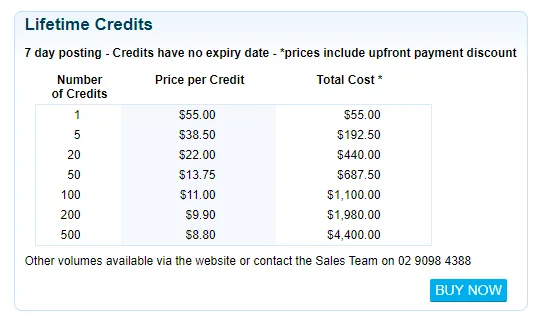
JobServe offers a range of plans. Choose the product that fits the expected hiring volume and the market where the advert will run. Review the total cost, duration, credits, and any performance-based conditions before confirming payment.

After publication, save the advert URL and source in your hiring record. Check that the advert is visible, that applications reach the intended inbox or ATS, and that the closing date is accurate.
How much does it cost to post on JobServe?
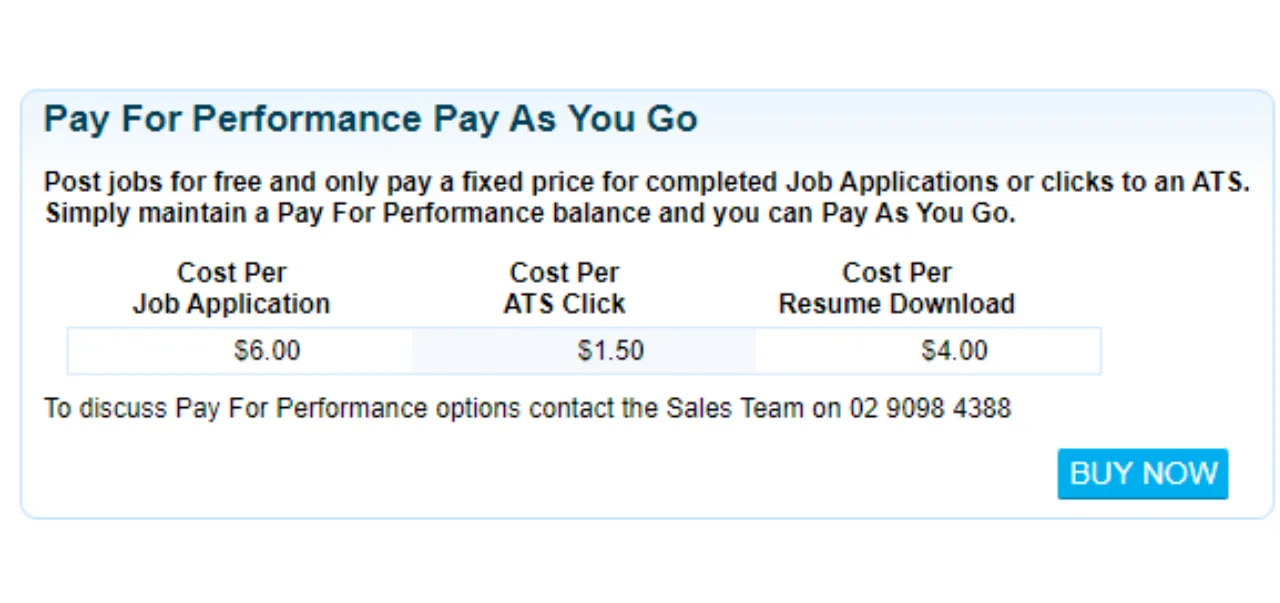
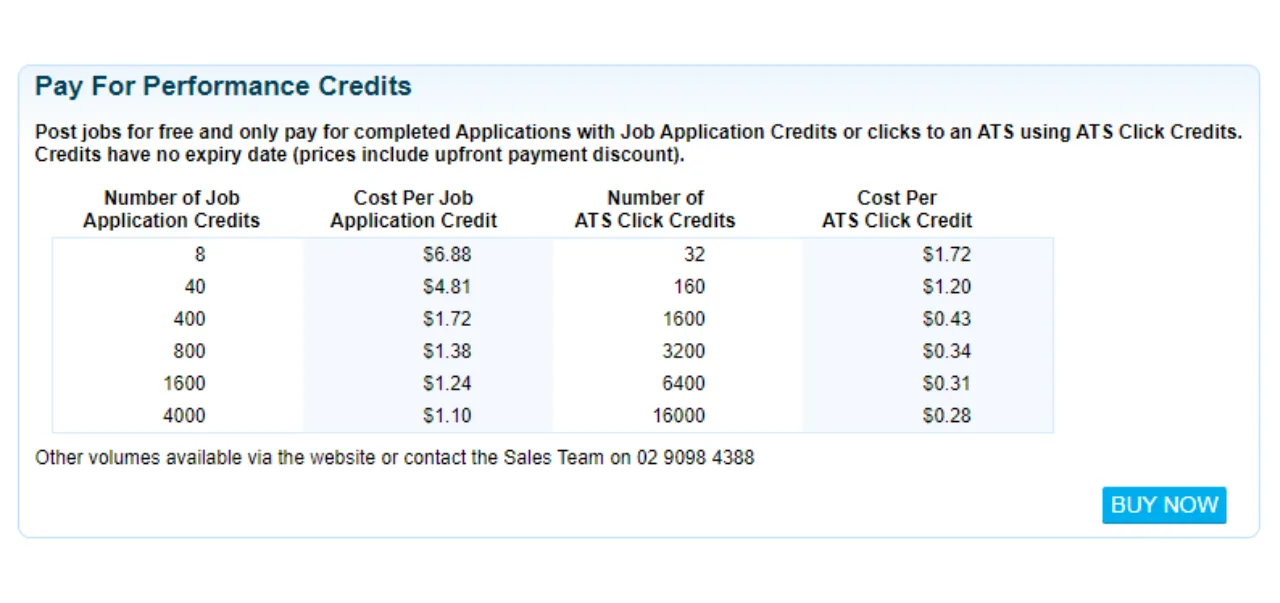
There is no single global price. JobServe’s regional pages show different currencies and products, including Quick Post, Lifetime Credits, Monthly Credits, and pay-for-performance options. Compare the live price for your country, the number of adverts or credits included, the active period, and any extra promotion before choosing. Older guides often combine a U.S. price with a U.K. product, which can make the comparison misleading.
JobServe job-post fields that improve matching
The best way to improve matching is to be specific in the fields candidates and alerts use. Put the main technology in the title or skills field, then separate must-have skills from useful experience. State whether the assignment is contract or permanent, identify the work location and remote rules, and include a realistic rate or salary where the employer can disclose it.
Avoid stuffing unrelated keywords into the advert. A candidate who applies because of a misleading title is unlikely to pass screening, and the extra response creates work without improving the shortlist.
Recruitment software and JobServe: choose the right distribution model
JobServe supplies specialist reach; recruitment software manages the workflow after an application arrives. If your team hires from several channels, connect JobServe to Recooty’s applicant tracking system or another approved workflow, then record JobServe as the source. Use how to choose the right recruitment software to define the fields, permissions, and reporting you need before selecting a tool.
Keep the JobServe advert and the ATS record aligned. When the rate, location, contract length, or application route changes, update the source record and close the advert when the role is filled. Track qualified applications, screen-to-interview rate, time to first qualified candidate, interview conversion, cost per qualified applicant, offer acceptance, and retention.
Conclusion: publish a clearer JobServe advert
JobServe can be a good fit for technical and contract hiring when the advert gives candidates enough detail to decide quickly. Register as an advertiser, choose the regional product that matches your hiring volume, complete the technical fields carefully, and review the live advert after publishing. A consistent application workflow then helps you see whether the channel is producing hires.
Frequently Asked Questions
How much does it cost to post a job on JobServe?
The price depends on the country, product, and hiring volume. JobServe’s live regional pages show different currencies and options such as Quick Post, Lifetime Credits, Monthly Credits, and pay-for-performance. Use the price page for the market selected in your account rather than relying on one global figure.
Which JobServe product is best for one vacancy?
Quick Post is designed for a one-off vacancy according to JobServe’s advertiser FAQ. Review the current duration, audience, and included features before checkout. Lifetime or Monthly Credits may make more sense when you expect several roles.
Can JobServe distribute a job to other boards?
JobServe provides its own specialist reach and products. If you need several job boards, use an approved recruitment workflow or ATS and confirm what each integration actually publishes. Do not assume that a tool distributes a job to every channel without checking its current terms.
Can I edit a JobServe job after publishing?
The available editing options depend on the product and account. Sign in to the advertiser area, update the source advert when permitted, and check the live copy afterward. If the role is materially different, closing the old advert and creating an accurate one may be safer.
Should JobServe applications go into an ATS?
Use an ATS when several people need to screen, interview, or report on the same candidates. It keeps JobServe as a traceable source while giving the team one candidate record, shared scorecards, reminders, and follow-up.
Additional Resources on Job Posting
- How to post a job on Monster
- How to post a job on CareerBuilder
- How to Post a Job on Google for Jobs Search Engine
- How to Post a Job on LinkedIn
- How to Post a Job on Craigslist
- How to Post a Job on ZipRecruiter
- How to Post a Job on Dice
- How to Post a Job on Indeed
- How to Post a Job on Snagajob
- How to Post a Job on Dribbble
- How to Post a Job on Seek
- How to post a job on Glassdoor
- How to Post a Job on Trovit
- How to post a job on Jooble
- How to Post Jobs on Juju.com
- How to Post a Job on TotalJobs
- How to post a job on Behance
- How to Post A Job on AngelList Talent (now Wellfound)
- How to Post a Job on JobSquare
Source: https://recooty.com/blog/how-to-post-a-job-on-jobserve/
Practical recruiting playbooks, HR tutorials and hiring trends from the team behind Recooty — hiring software for growing teams.


