How to post a job on Jooble | 5 Easy Steps
Learn how to post a job on Jooble in just five steps: directly, via XML, or ATS—with free or premium options for global hiring. Start attracting top talent now!


CONTENTS
- 01Key takeaways
- Step-by-Step: How to Post a Job Directly on Jooble
- Post Jobs on Jooble by Integrating Your Careers Page or XML Feed
- Post a Job on Jooble Using an Applicant Tracking System
- 02Pricing for Posting a Job on Jooble
- 03Jooble publishing routes and hiring measurement
- 04Jooble Free, Standard, and Premium plans: what the current model means
- The Recooty editorial view
- 05Jooble listing quality and feed hygiene checklist
- 06Jooble performance measurement for an ATS or hiring dashboard
- 07Conclusion: keep Jooble publishing and follow-up connected
- 08Frequently Asked Questions
- More Resources on Job Posting:
Key takeaways
- Jooble is primarily a job aggregator and search platform. Employers can publish through a direct account in supported countries, an XML feed, an ATS, or a paid promotion route.
- Jooble’s current 2026 employer help page describes Free, Standard, and Premium plans. The Free plan is not available in every country and is currently described as one job at a time for seven days, followed by manual reactivation.
- Free listings have lower visibility and are not included in job-alert newsletters under the current plan explanation. Standard and Premium add visibility, alerts, application options, and, on Premium, stronger branding and placement.
- Paid Jooble promotion can use pay-per-click or pay-per-action models. The right comparison is cost per qualified applicant, not a generic “premium package” price copied from an older guide.
- Use recruitment software as the source of truth when Jooble receives jobs from a careers page, XML feed, or ATS. Keep the job title, location, salary, status, application URL, and expiry synchronized across every route.
Jooble was founded in 2006 and is headquartered in Kyiv, Ukraine. It operates across many markets as a job search and aggregation platform.
This guide covers direct posting where it is available, careers-page or XML-feed distribution, and posting through an Applicant Tracking System (ATS).

Step-by-Step: How to Post a Job Directly on Jooble
Direct posting on Jooble is available for employers in these countries: Argentina, Bulgaria, Bosnia and Herzegovina, Colombia, Croatia, Czech Republic, France, Greece, Hungary, Indonesia, Italy, Kazakhstan, Mexico, Netherlands, Norway, Peru, Poland, Romania, Serbia, Slovakia, Spain, Sweden, Thailand, Turkey, and Ukraine.
Step 1: Create an Employer Account
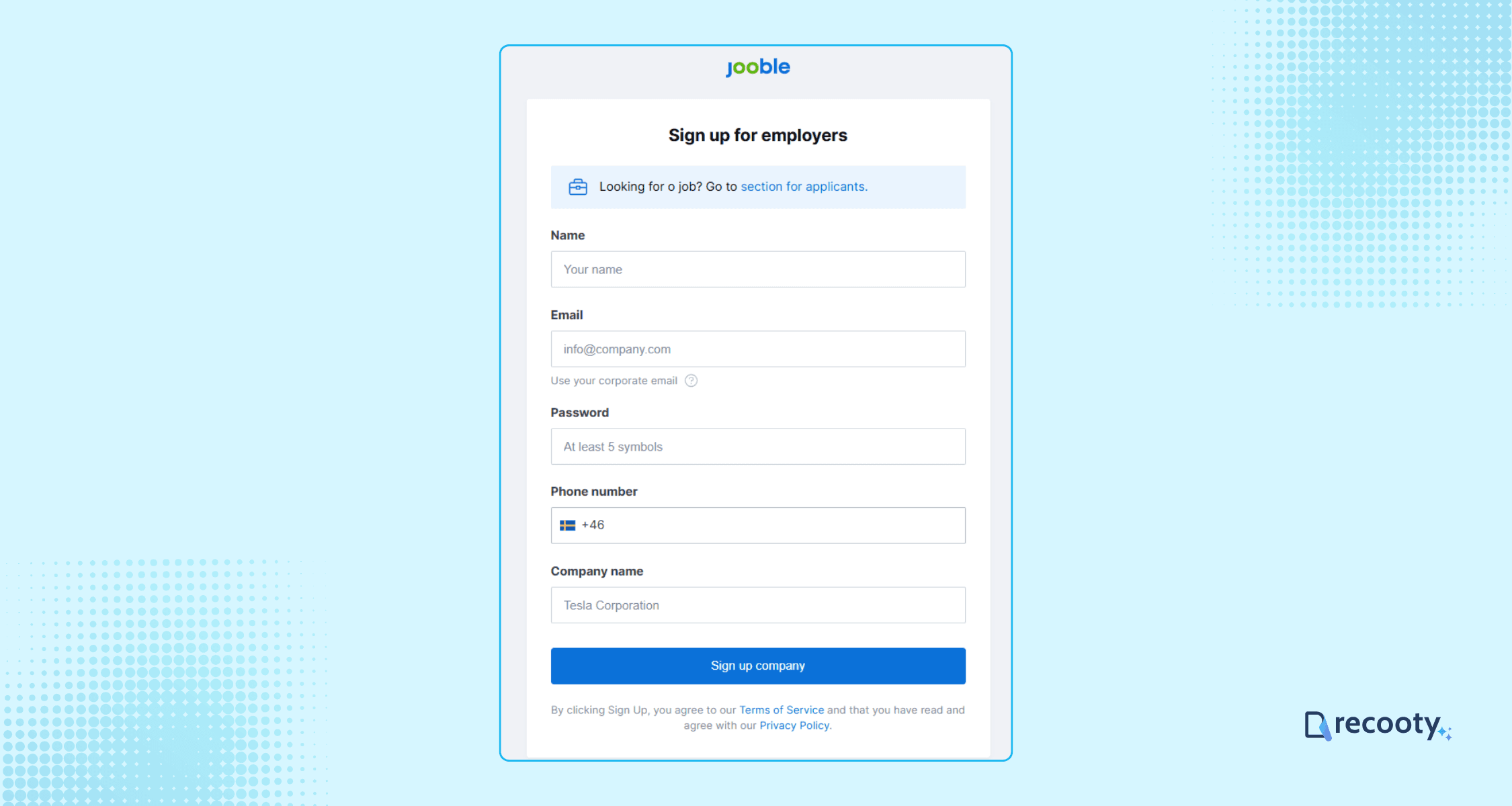
Go to the Jooble website and click Post a Job to access the sign-up page.
You will be redirected to the sign-up page where create an employer account by entering the basic info as name, phone number, company name, and more.
Step 2: Enter all the Job details
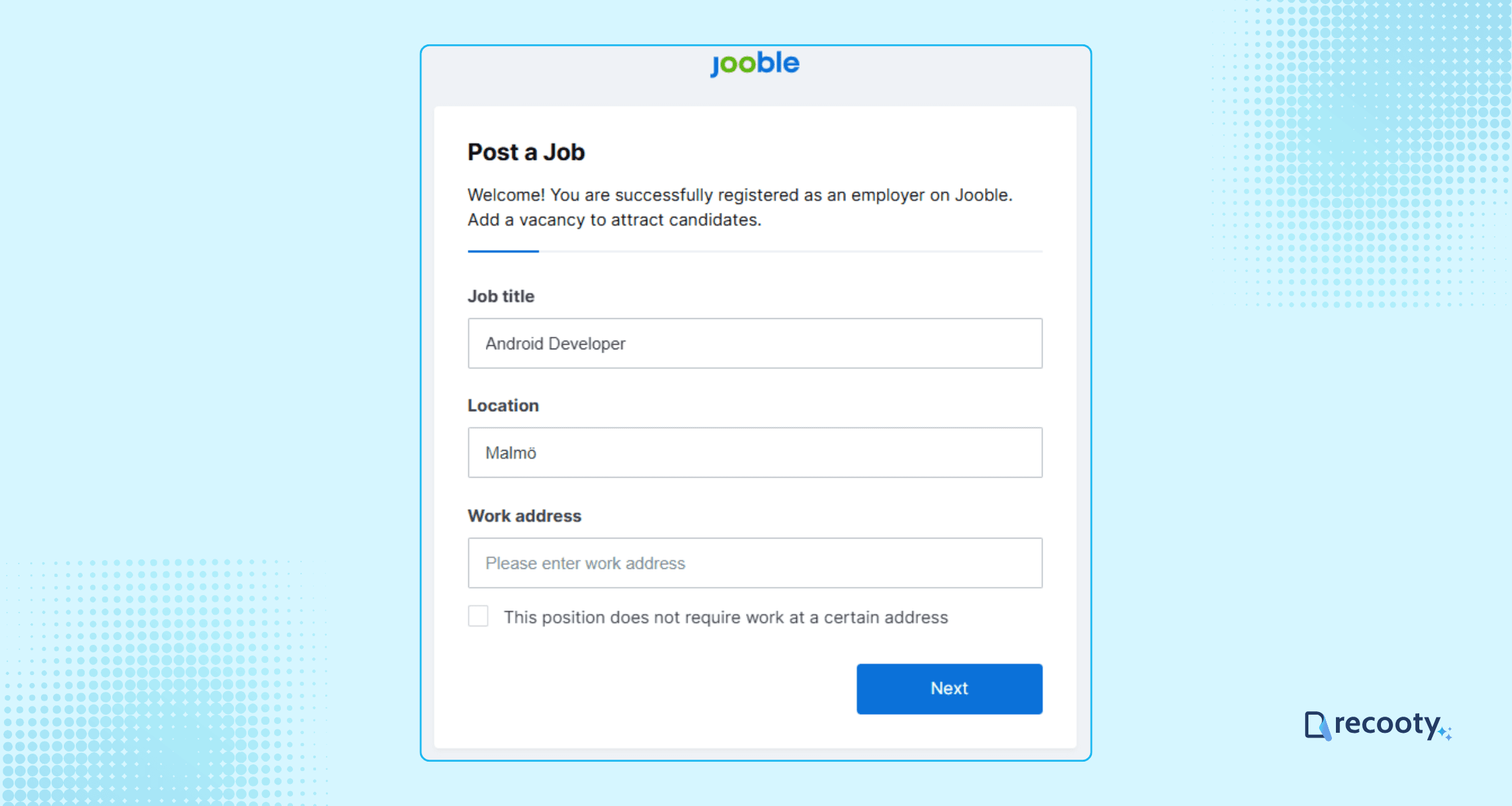
Fill in the basic details, such as job title, location, and work address, to start posting the job.
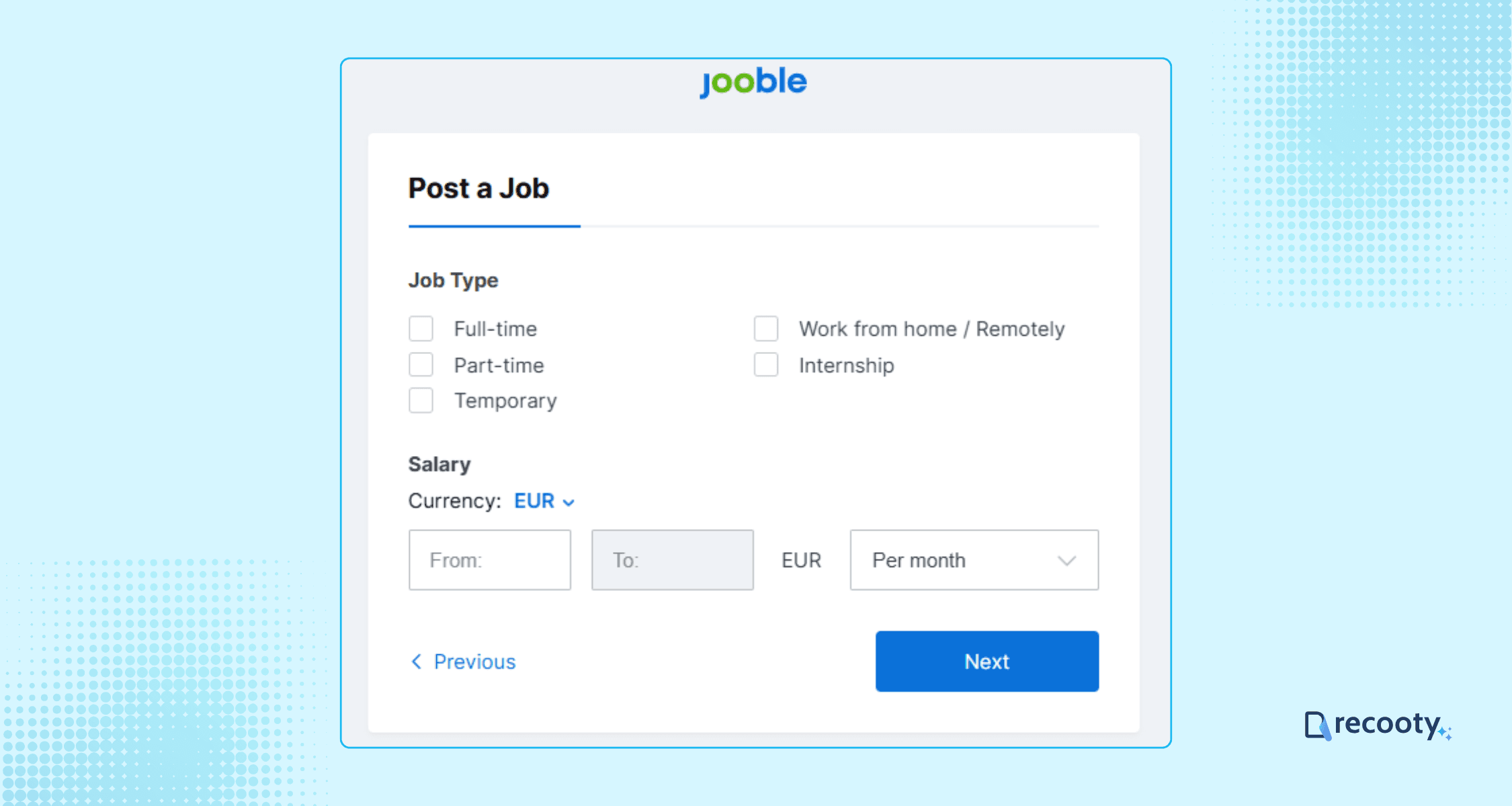
Enter job type, salary, and click on Next.
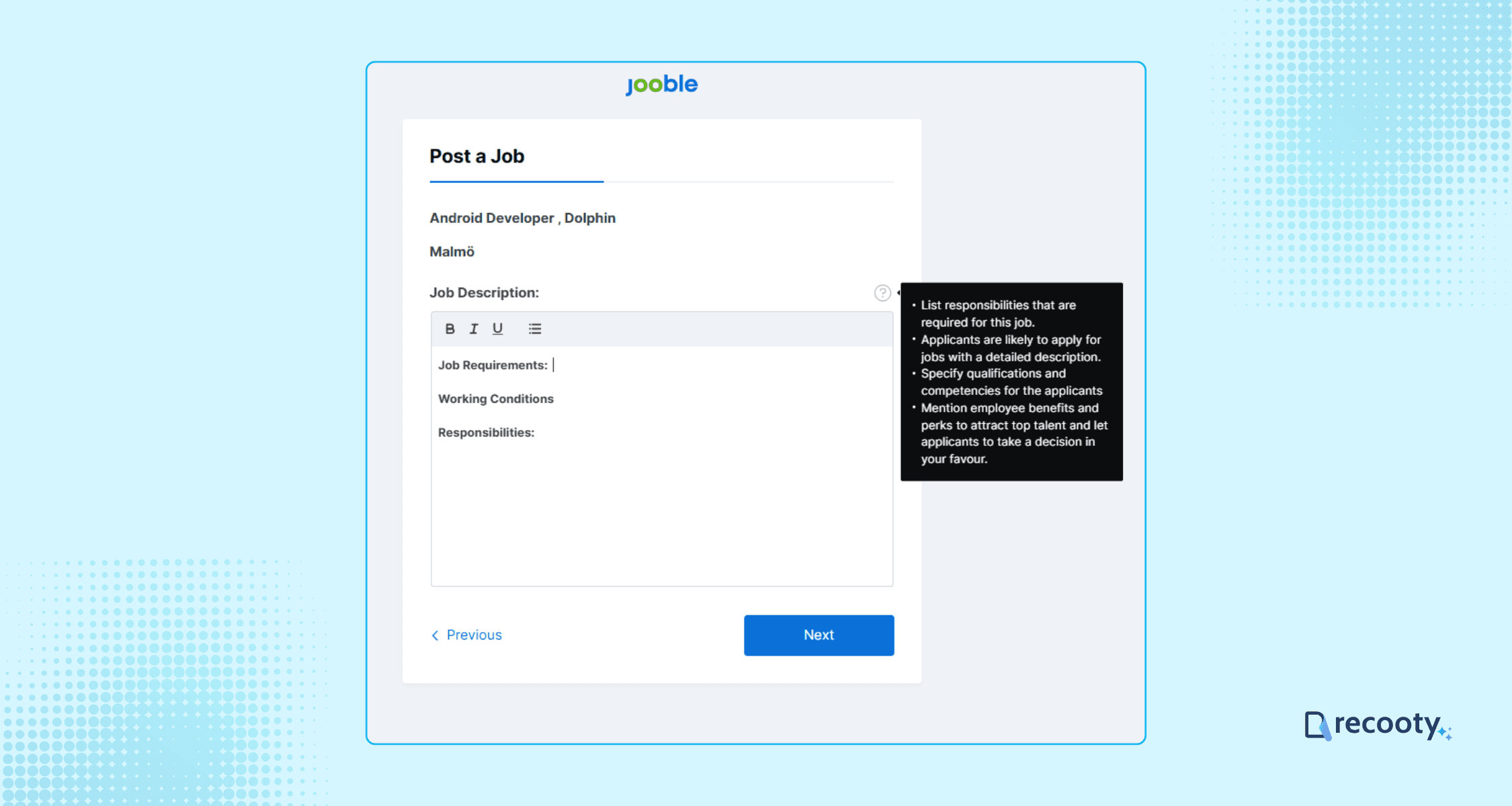
Write a detailed job description including responsibilities, requirements, and a brief about your company.
To create an SEO-optimized and bias-free job description, consider using Recooty’s free AI job description generator.
Step 3: Add Screening questions
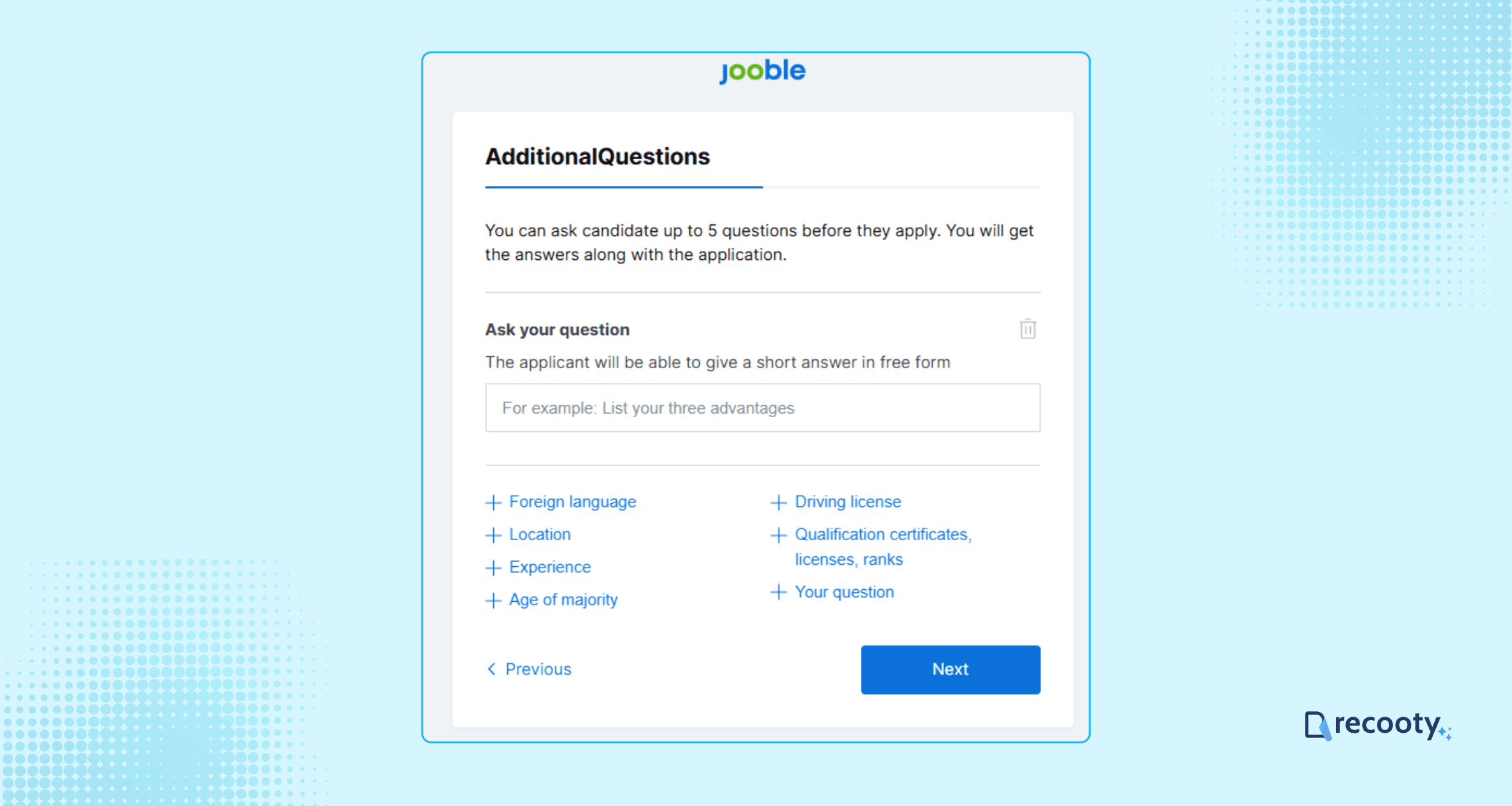
Add up to 5 screener questions to filter candidates based on experience or qualifications, or customize your own.
This helps ensure you receive applications from the most relevant candidates.
Step 4: Choose Response Type
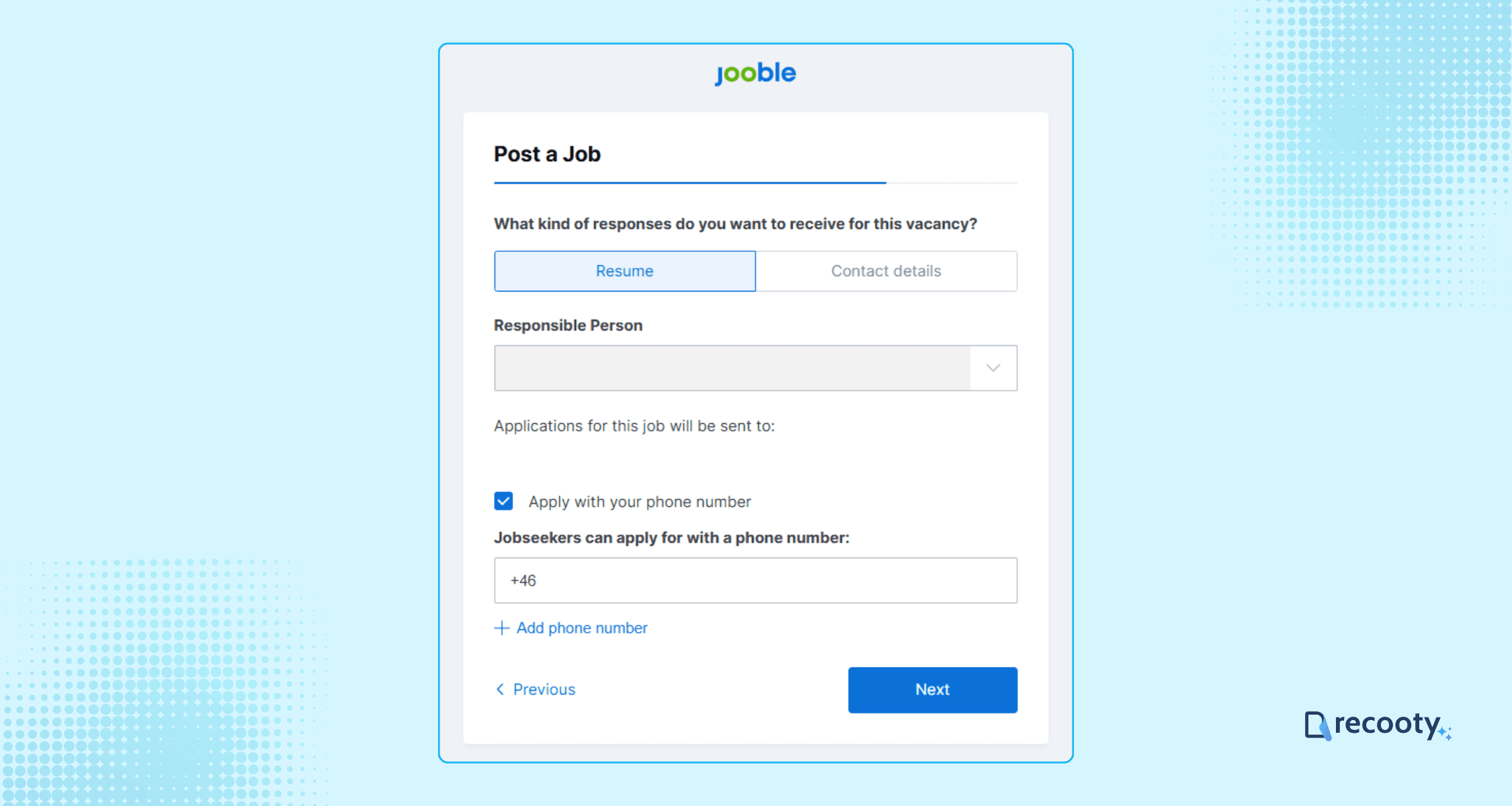
Choose the type of responses you prefer from candidates: resume or contact details.
Step 5: Preview and Post the Job
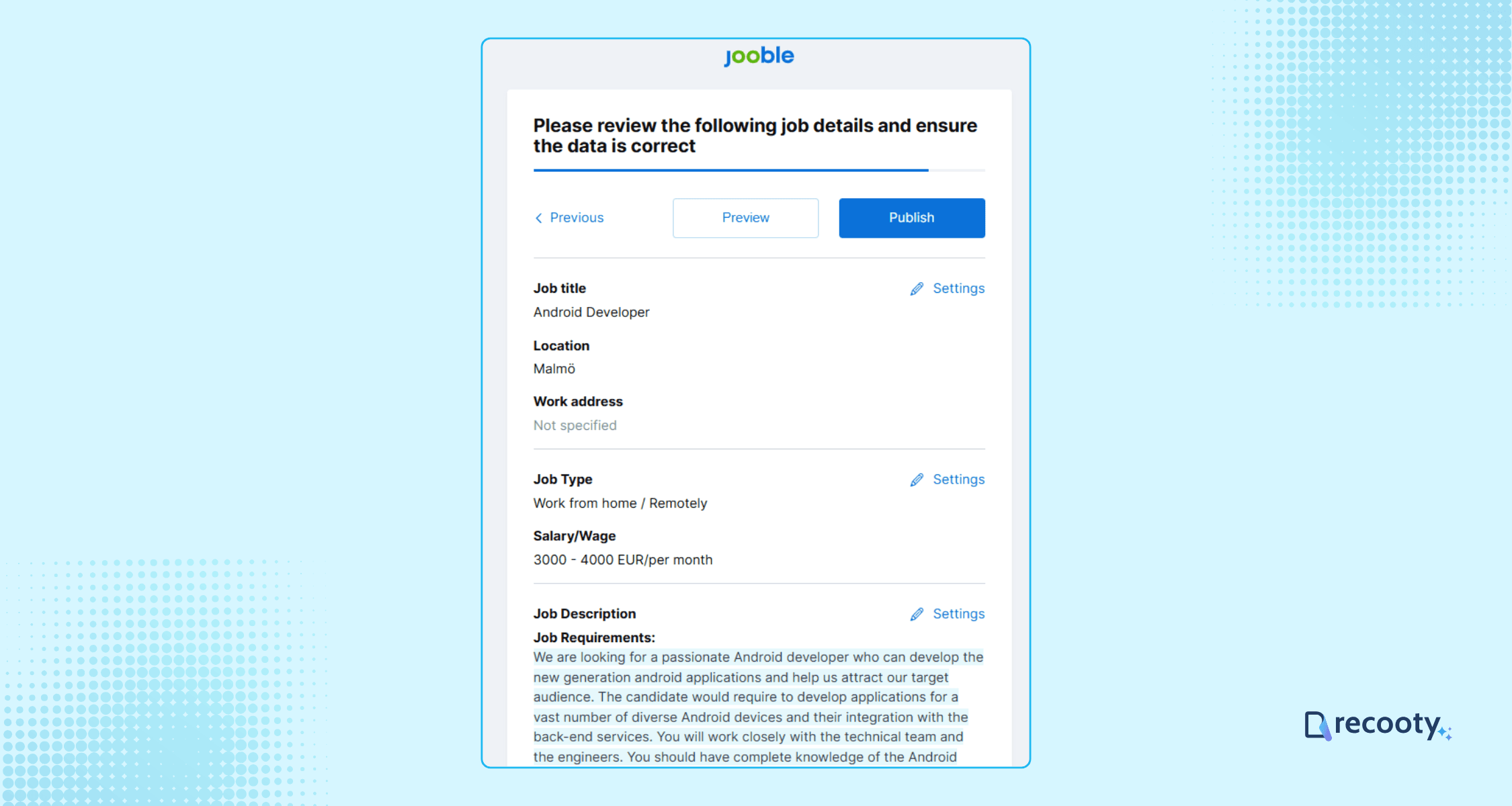
Preview your job posting for accuracy and completeness.
Once satisfied, click Publish to make your job live on Jooble.
Jooble’s team will review your job posting, which typically goes live within 10 to 60 minutes during business hours.
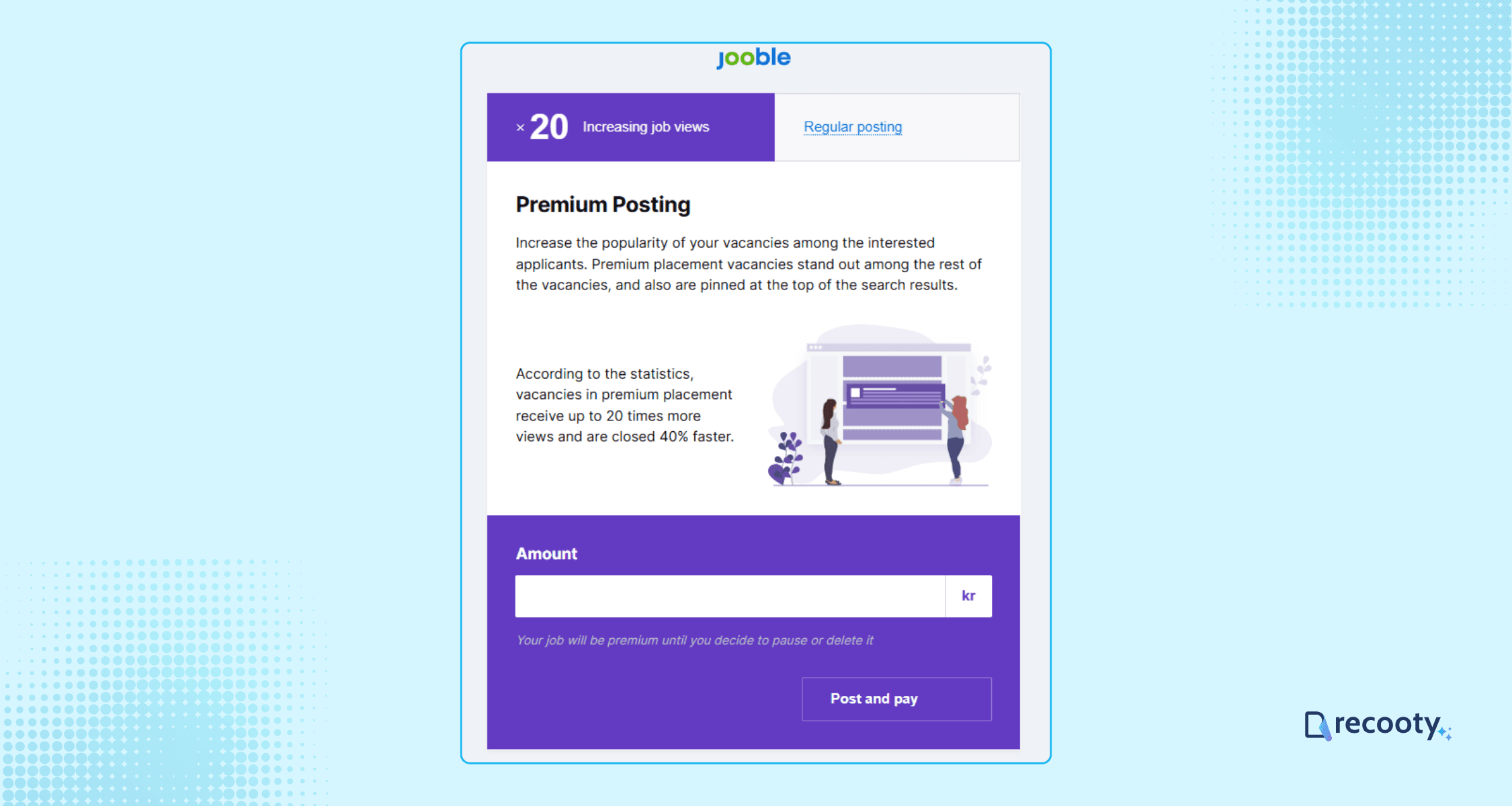
After publishing, you may be prompted to opt for Jooble’s premium job posting features.
Post Jobs on Jooble by Integrating Your Careers Page or XML Feed
You can post jobs on Jooble by sharing a link to your careers page with open roles or by providing an XML feed containing your job listings.
Simply fill out Jooble’s application form with the relevant link, and make sure your XML feed follows their required format and guidelines for smooth integration.
Post a Job on Jooble Using an Applicant Tracking System
With Recooty, you can post your jobs to Jooble and premium job boards like LinkedIn, Indeed, and Glassdoor from one dashboard.
Manage, track, and evaluate every candidate from a single, easy-to-use dashboard, saving you time and effort throughout the hiring process.
Start attracting top talent and simplify your recruitment. Try Recooty for free today!
Pricing for Posting a Job on Jooble
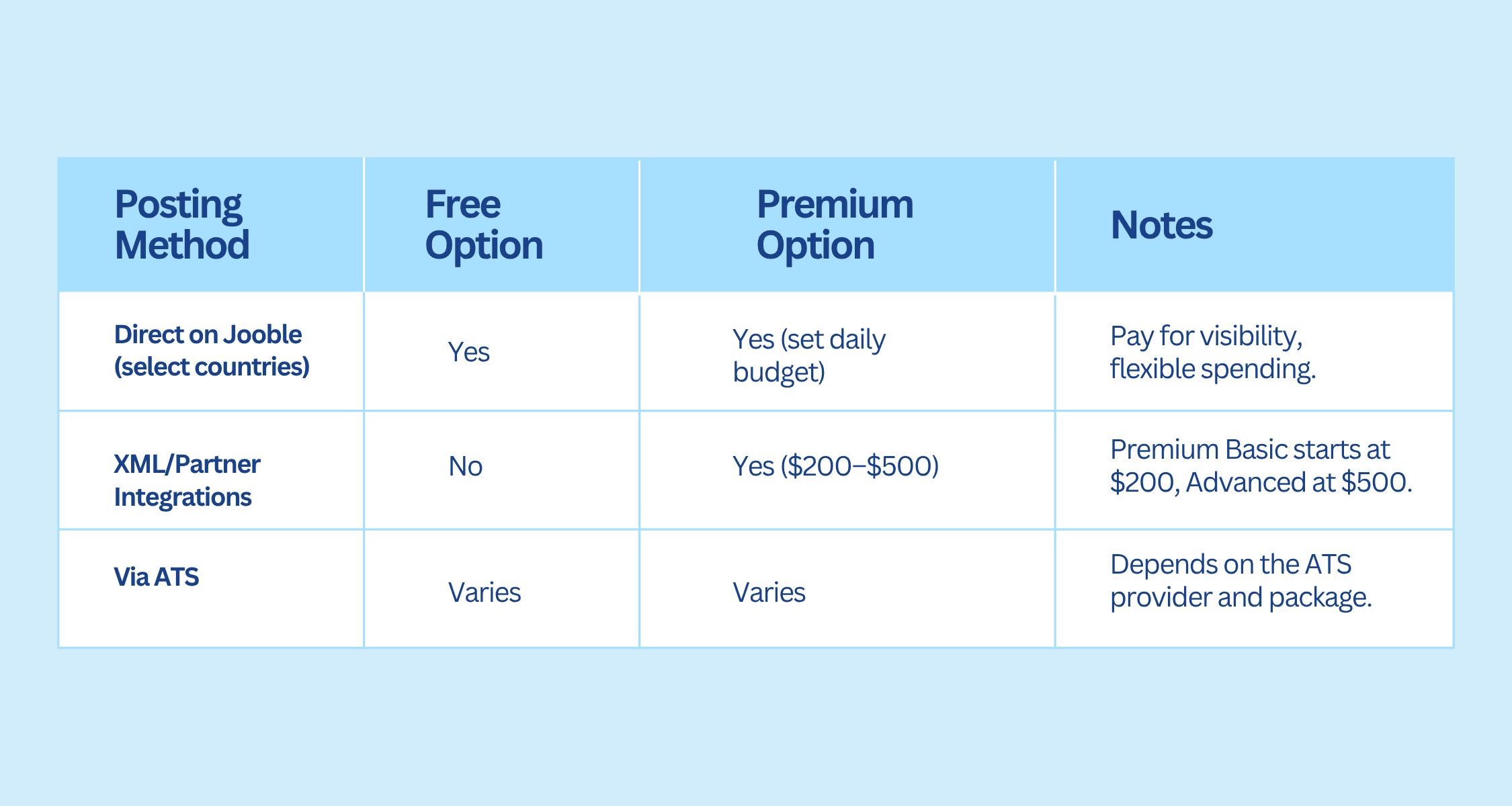
Free Posting (Direct via Jooble):
You can post jobs for free directly on Jooble in select countries. This option is best for basic visibility and reaching local candidates without any cost.
Paid Posting (Direct via Jooble):
For more exposure, you can use Premium job posting by adding funds to your Jooble account and setting a daily budget for each vacancy. You only pay for the visibility your job receives, allowing flexible and controlled spending.
Paid Posting (XML/Partner Integrations):
If you post jobs through XML feeds or as a partner site, Jooble offers fixed premium packages:
- Premium Basic starting at $200.
- Premium Advanced starting at $500.
These packages provide top search placement, branding, and advanced analytics, and are required for multi-site or multi-country postings.
For more detailed information, visit Jooble’s partners page.
Jooble publishing routes and hiring measurement
Jooble can receive jobs from a direct employer account, a careers page or XML feed, an ATS, or a paid promotion campaign. Decide which system owns the job record before you publish, then keep the title, location, salary, status, application URL, and expiry synchronized.
| Route | Best fit | Current control | Main risk |
|---|---|---|---|
| Direct Jooble account | One-off hiring in a supported country | Job Builder, apply settings, plan, and listing status | Country availability and free-plan limits may differ |
| Careers page or XML feed | Employers with a maintained job site | Canonical URL, structured fields, refresh and expiry | Stale feeds or invalid fields can keep old jobs visible |
| Recruitment software or ATS | Teams hiring across several boards | One job record, application flow, source tracking, and stages | The ATS integration still needs a clear status and URL owner |
| Paid Jooble promotion | Urgent, competitive, or multi-market hiring | PPC or pay-per-action budget and targeting | More traffic can raise cost without improving candidate quality |
The current Jooble subscription explanation covers the registration, Job Builder, apply settings, pricing, and payment flow. Use that page and the local pricing page for account-specific limits. The Jooble XML specification is the better source for feed fields, update times, and destination URLs.
Jooble Free, Standard, and Premium plans: what the current model means
| Plan | Visibility and duration | Apply and workflow features | Best use |
|---|---|---|---|
| Free | One job at a time for up to seven days in the current help-page description; lower visibility and no promotional newsletters | Basic direct posting; manual reactivation after the listing expires | A small, supported-market test |
| Standard | Extended active period, stronger search visibility, and targeted job-alert inclusion | May include direct applications to your URL or ATS, pre-qualifying questions, and phone applications depending on account | Hiring teams that need reach and a controlled application path |
| Premium | Standard features plus maximum exposure and company-logo branding | Adds stronger on-site and alert placement and brand visibility | Urgent or recurring hiring where incremental quality can be measured |
Jooble’s advertising page describes pay-per-click and pay-per-action campaigns, budget limits, analytics, logo visibility, pre-screening questions, and delivery through its site, inbox, mobile app, and partner network. Treat older package examples as historical or market-specific references rather than a universal price list.
The Recooty editorial view
Use Free to test whether the role attracts relevant candidates in the target market. Move to Standard or Premium when the role has a real visibility problem and the team can respond quickly. For repeat hiring, an ATS often deserves priority because it makes source and stage data usable across channels.
Jooble listing quality and feed hygiene checklist
Before publishing directly or sending an XML feed, check the fields that determine relevance and candidate trust:
- Title: Use the familiar job title and include only genuine skills or specialization.
- Location: State the actual city, country, remote arrangement, and applicant eligibility.
- Employment type: Distinguish permanent, contract, part-time, freelance, and internship roles.
- Salary: Include a real amount, currency, and pay period where available.
- Description: Explain outcomes, responsibilities, must-have qualifications, schedule, benefits, and application steps.
- Apply URL: Send candidates to a working, mobile-friendly destination that identifies the role and preserves Jooble as the source.
- Status: Remove or update the role when it is filled, paused, or materially changed.
- Feed freshness: Keep XML dates and links accurate. Test a sample job after every feed or ATS change.
Jooble supports discovery, but the source system and recruiting team still own page accuracy, application completion, and candidate tracking. Track those steps instead of judging the channel by views alone.
Jooble performance measurement for an ATS or hiring dashboard
| Metric | What it answers | Decision |
|---|---|---|
| Views and clicks | Is Jooble finding the intended audience? | Refine title, location, category, or budget |
| Apply starts | Does the landing page match the listing? | Fix the application path or remove friction |
| Completed applications | Is the process usable? | Check mobile, fields, and redirect behavior |
| Qualified applications | Is the traffic relevant? | Adjust description, screening, or targeting |
| Interview and offer rate | Does the source produce viable candidates? | Keep, reduce, or increase the budget |
| Cost per qualified applicant | Is paid distribution efficient? | Compare Free, Standard, Premium, PPC, and other boards |
For the workflow layer, connect Jooble to Recooty’s applicant tracking system and compare it with how to choose the right recruitment software. If the role is syndicated to several boards, how to create a career page that converts helps keep the destination page consistent with the feed.
Conclusion: keep Jooble publishing and follow-up connected
Choose the Jooble route that fits your market, prepare a clear listing, and test the application path before launch. Keep the source record current after publication, then review qualified applications and hiring outcomes before increasing spend.
Frequently Asked Questions
Can I post a job on Jooble for free?
In supported markets, yes, but the current Jooble plan explanation says the Free plan allows one job at a time for seven days and requires manual reactivation. Free posting is not available in every country, so check the local pricing page before relying on it for a campaign.
Is Jooble a job board or a job aggregator?
It is primarily a job aggregator and search platform, but it also offers direct employer posting and paid promotion in supported markets. Jobs can arrive from public sources, partner boards, ATS connections, XML feeds, or a direct Jooble account.
How much does Jooble premium job posting cost?
There is no single global price to quote safely. Jooble offers country-specific plans and performance routes such as pay per click or pay per action. Use the live employer account or contact route to confirm budget, duration, taxes, and included distribution.
Can I post jobs on Jooble through an ATS?
Yes. Jooble’s “How it works” information describes ATS and XML-feed routes. Confirm which system owns the canonical job URL, how often the feed updates, how applications are attributed, and how filled roles are removed.
How long does a job stay active on Jooble?
The current Free-plan explanation says seven days with manual reactivation, while other plans and feed-based listings can have different terms. Jooble’s help content also describes a standard 45-day duration for some premium or feed workflows. Check the plan and market attached to your account rather than assuming one duration applies everywhere.
Should I pay for Jooble promotion?
Test paid promotion when the role is urgent, competitive, or underexposed in the target market. Set a budget and a quality threshold before launching, then stop or change the campaign if clicks rise without qualified applications or interviews.
More Resources on Job Posting:
Source: https://recooty.com/blog/how-to-post-a-job-on-jooble/
Practical recruiting playbooks, HR tutorials and hiring trends from the team behind Recooty — hiring software for growing teams.


